ASRDATE Action in Studio – Complete Guide with Workflow, Configuration, and Real-World Examples
 VoIP Trainers4 min read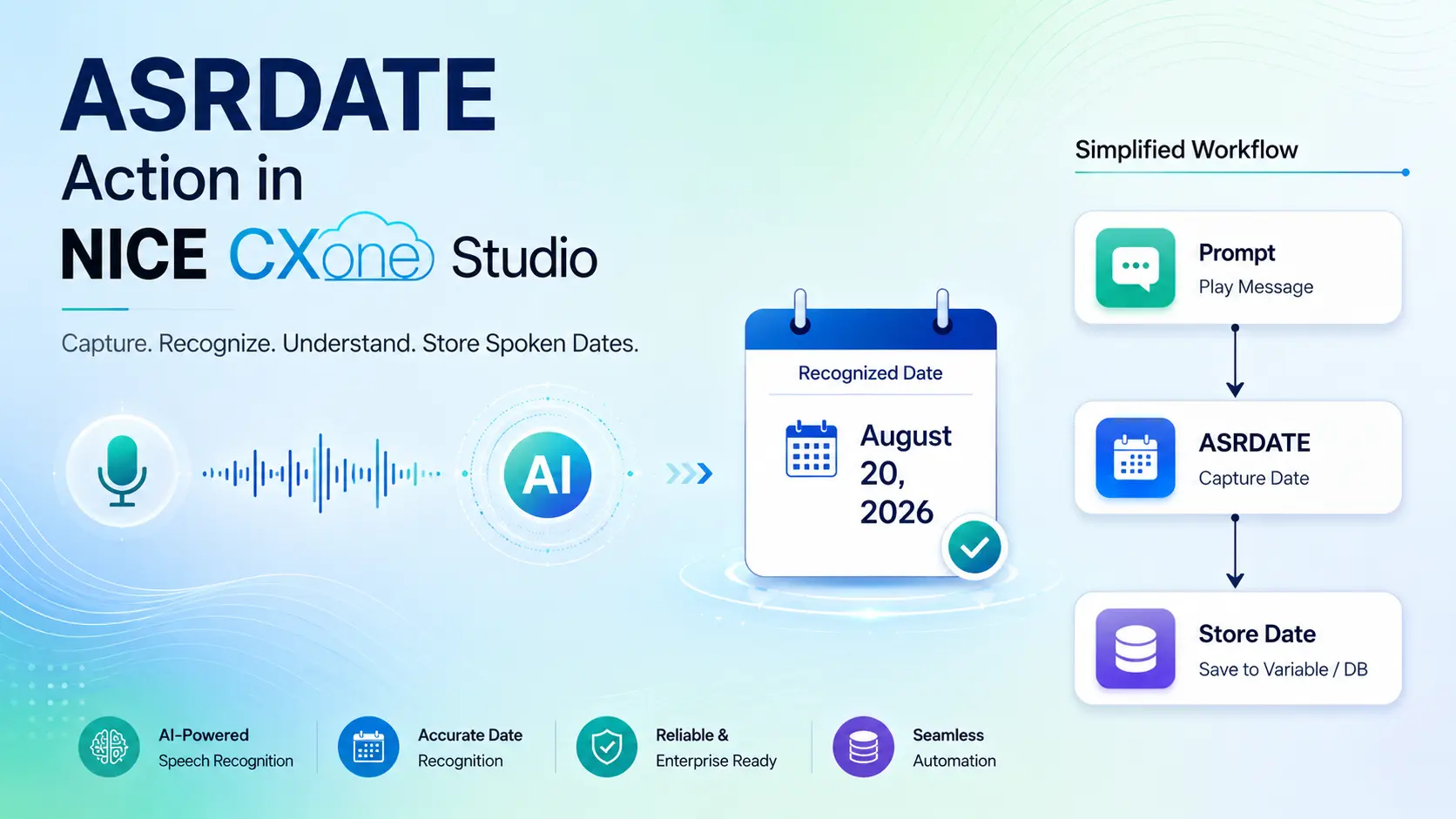
The ASRDATE Action in NICE CXone Studio allows the IVR system to capture and recognize dates spoken by callers. It converts natural language date inputs into a format that can be stored and processed within the script.
Common use cases include:
- Payment date collection
- Date of birth verification
- Appointment scheduling
- Service booking dates
- Delivery date confirmation
- Holiday and leave requests
What is ASRDATE Action in Studio?
ASRDATE uses Automatic Speech Recognition (ASR) technology to understand spoken dates from callers.
The action can recognize:
Full Dates
- July Fifth Two Thousand Twenty-Six
- August 15th 2026
Month and Day
- March Fourteenth
- December Twenty Fifth
Days of Week
- Monday
- Friday
Relative Dates
- Today
- Tomorrow
- Yesterday
American Date Format
- August Second
European Date Format
- Second Day of August
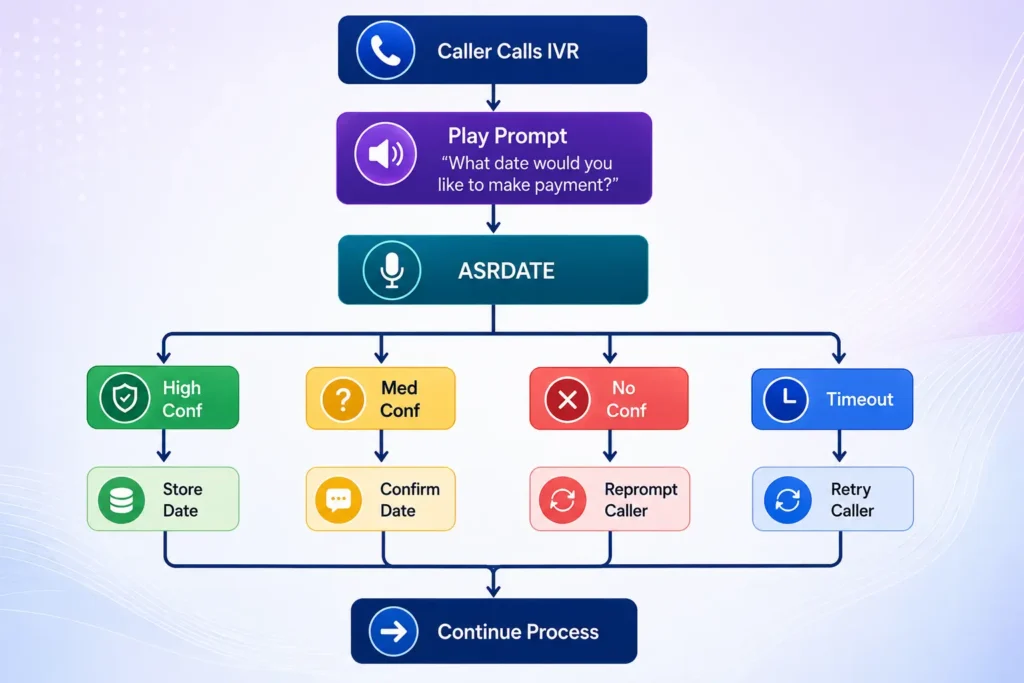
ASRDATE Workflow Diagram
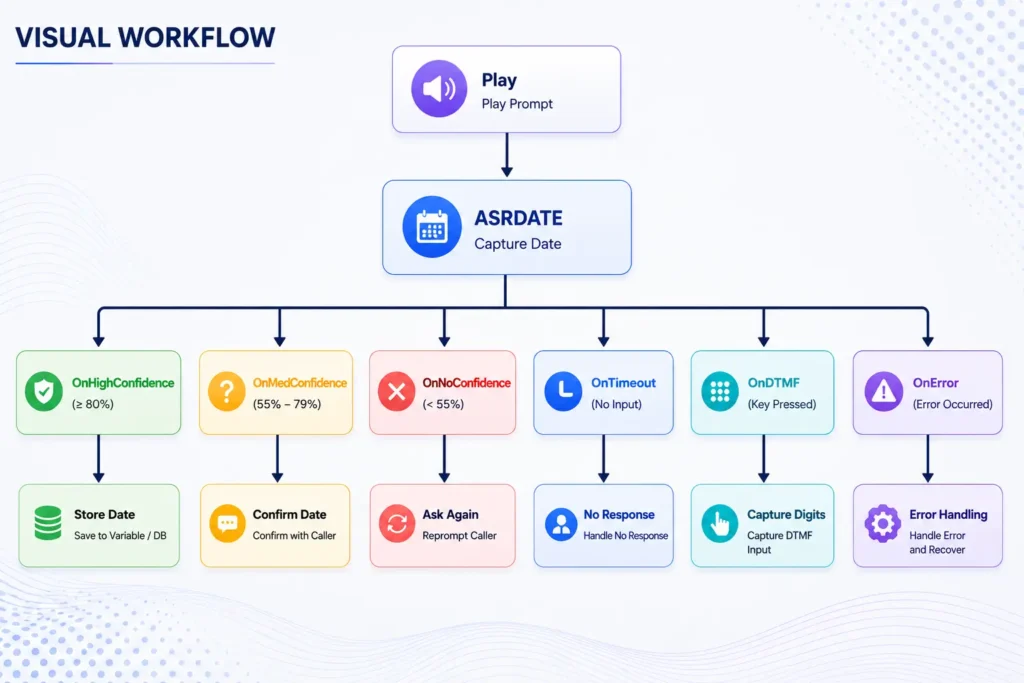
Visual Workflow
ASRDATE Action Properties
- Caption
Used to identify the action within Studio.
Example:
Collect Payment Date
- Sequence
Prompt played to the caller.
Example:
Please tell me the date you would like to make your payment.
or
What is your date of birth?
Source:
- Phrase
Documentation field only.
Example:
Please tell me your appointment date.
This field does not affect script execution.
Source:
- HighConfidence
Defines confidence level required for automatic acceptance.
Default:
80
Example:
If ASR returns:
Confidence = 92%
Then:
OnHighConfidence
branch executes.
Source:
- MinConfidence
Minimum confidence accepted.
Default:
55
Example:
Confidence = 65%
Result:
OnMedConfidence
Source:
Confidence Decision Flow
Confidence Returned │ ▼ ┌───────────────────┐ │ >= 80% │ └──────┬────────────┘ ▼ OnHighConfidence
┌───────────────────┐ │ 55% - 79% │ └──────┬────────────┘ ▼ OnMedConfidence
┌───────────────────┐ │ <55% │ └──────┬────────────┘ ▼ OnNoConfidence
- TimeoutSeconds
Determines how long the IVR waits for a response.
Default:
10 Seconds
Example:
TimeoutSeconds = 15
Caller remains silent for 15 seconds:
OnTimeout
branch executes.
Source:
- ResultVarName
Stores recognized date value.
Example:
PaymentDate
Recognized Input:
August 15th 2026
Stored In:
PaymentDate
Source:
- ConfidenceVarName
Stores confidence score.
Example:
ASRConfidence
Returned:
92
Source:
- DetectDTMF
Allows caller to use keypad instead of speech.
True
Accepts:
- Voice Input
- Keypad Input
False
Accepts:
- Voice Only
Source:
DTMF Workflow
Caller Input │ ▼ Speech or Key Press? │ ┌────┴─────┐ ▼ ▼ Speech DTMF │ │ ▼ ▼ ASR OnDTMF │ ▼ Capture
- ClearDigits
Controls DTMF buffer.
True (Recommended)
Old digits removed
False
Old digits retained
Can accidentally trigger OnDTMF branch.
Source:
- Reference Property
Determines how incomplete dates are interpreted.
ImplyNext
Example:
Caller says:
March 10
System assumes:
Upcoming March 10
ImplyLast
Caller says:
March 10
System assumes:
Previous March 10
None
No automatic interpretation.
Default setting.
Source:
- YearRequired
Determines whether year must be spoken.
True
Caller must say:
March 10 2026
False
Caller can say:
March 10
Result Branches
OnHighConfidence
Used when recognition is highly accurate.
Caller: July 15 2026
Confidence: 95%
Action:
Store Date Continue
Source:
OnMedConfidence
Caller:
July 15
Confidence:
68%
Action:
Confirm Date
Example:
Did you say July 15th?
Source:
OnNoConfidence
Caller speech unclear.
Action:
Repeat Prompt
Source:
OnTimeout
Caller remains silent.
Action:
No response detected. Please try again.
Source:
OnDTMF
Caller presses:
1
Instead of speaking.
Action:
Capture
must be used.
Source:
OnError
Handles:
- Network issues
- Grammar failures
- ASR engine issues
- Syntax errors
Real-World Example: Payment Date Collection
Customer Prompt
Please tell me the date you would like to make your payment.
Caller Response
August 20th 2026
Studio Flow
Play │ ▼ ASRDATE │ ▼ OnHighConfidence │ ▼ Assign PaymentDate │ ▼ CRM Update │ ▼ Confirmation
Real-World Example: Date of Birth Verification
Please tell me your date of birth.
Caller:
March 5th 1995
Workflow:
ASRDATE │ ▼ Store DOB │ ▼ Database Validation │ ▼ Identity Verification
Best Practices
Use High Confidence = 80+
Provides more accurate recognition.
Enable Confirmation for Medium Confidence
Did you say July 15th?
Enable DTMF Backup
Allows callers to use keypad input.
Clear DTMF Buffer
ClearDigits = True
Prevents accidental digit detection.
Set Proper Timeout
Recommended:
10–15 Seconds
Conclusion
The ASRDATE Action in NICE CXone Studio is a powerful speech recognition tool that enables IVR applications to capture spoken dates accurately. It supports full dates, partial dates, weekdays, and relative date expressions while providing intelligent confidence scoring and DTMF fallback options. By properly configuring confidence thresholds, timeout settings, and date interpretation options, organizations can build highly effective self-service applications for payment scheduling, appointment booking, date-of-birth verification, and customer service automation.
Learn ASRDATE, ASRDIGITS, ASRCURRENCY, ASRYESNO, and advanced IVR scripting through customized NICE CX Training from VoIP Trainers with real-time lab practice and project-based learning.