Capture Action in NICE CXone Studio
 VoIP Trainers3 min read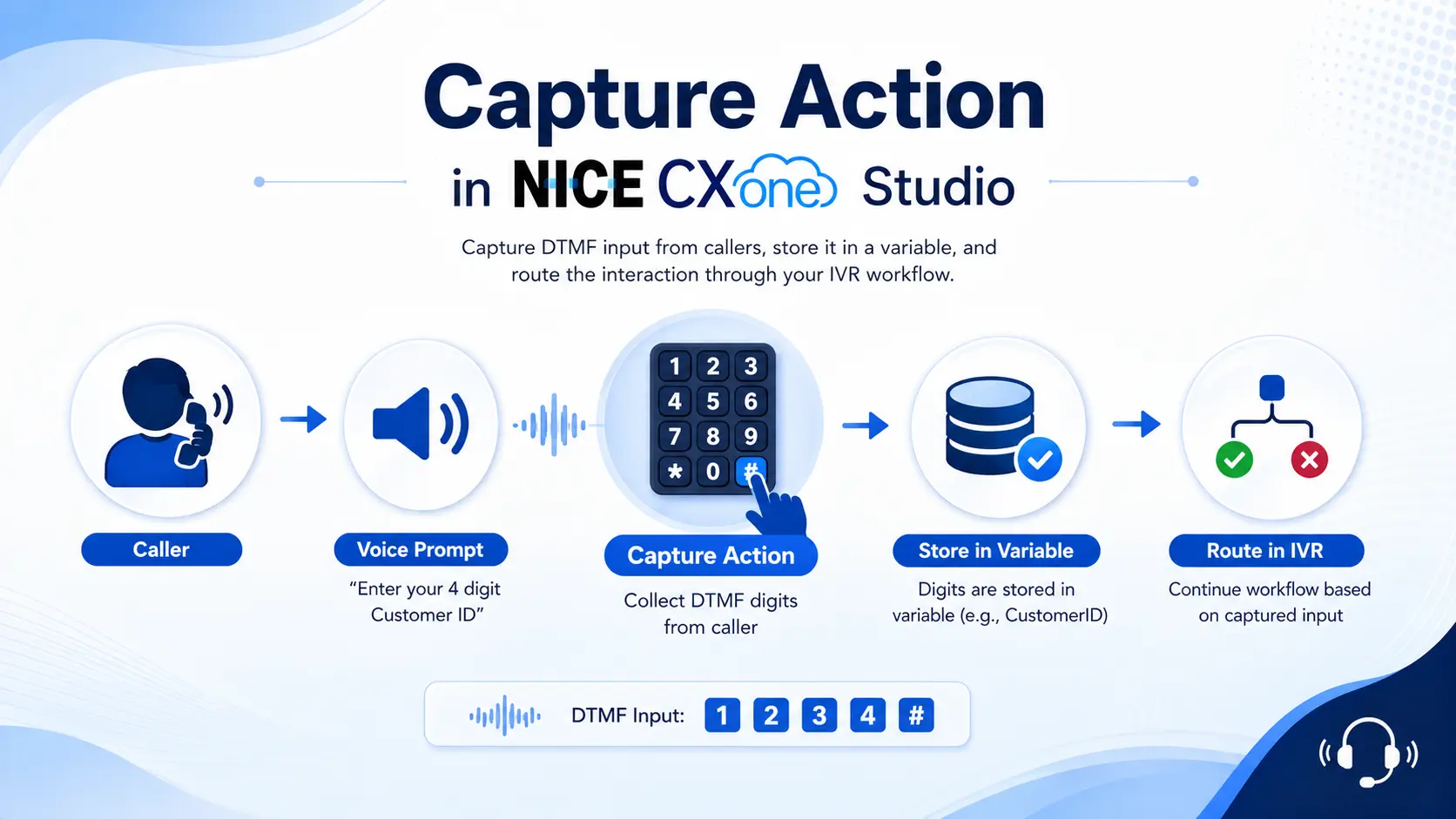
What is the Capture Action?
The Capture action is used to collect DTMF (Dual Tone Multi Frequency) input from callers during a phone interaction.
DTMF refers to the keypad tones generated when a caller presses numbers such as:
0 1 2 3 4 5 6 7 8 9 * #
The Capture action listens for those keypad presses and stores them into a variable for further processing within the script.
Common Use Cases
Collect Account Number
Capture Customer ID
Capture PIN Number
Request Callback Option
Menu Selection (Press 1 for Sales)
OTP Verification
NICE CXone Capture Action
Supported Script Types
How Capture Works
High-Level Flow
Capture Architecture
Input Properties
1. Caption
Purpose
Provides a friendly name for the action.
Example
Capture Customer ID Capture PIN Capture Callback Request
Studio View
[CAPTURE] Customer ID
2. Variable
Purpose
Stores the caller’s keypad entry.
Example
Variable = CustomerID
Caller enters:
12345
Stored value:
CustomerID = 12345
Diagram
Caller Input │ ▼ 12345 │ ▼ CustomerID Variable │ ▼ CustomerID=12345
3. MaxDigits
Purpose
Defines the maximum digits allowed.
Example 1
Request:
Enter your 4 digit PIN
Configuration:
MaxDigits = 4
Input:
1234
Capture stops immediately after digit 4.
Example 2
Prompt:
Enter 4 digit PIN followed by #
Configuration:
MaxDigits = 5
Input:
1234#
Count:
1 2 3 4
Total = 5 characters
Visual Example
Input Stream
1 → 2 → 3 → 4 → #
MaxDigits = 5
Reached Limit │ ▼ MaxDigits Branch
4. Terminator
Purpose
Specifies which key indicates completion of input.
Usually:
Example
Prompt:
Enter account number followed by #
Configuration:
Terminator = #
Input:
987654#
Output
Variable = 987654#
Excluding Terminator
Configuration:
Terminator = #-
Input:
987654#
Stored Value:
987654
The # is removed before storage.
Diagram
987654# │ ▼ Terminator Found │ ▼ Store Value │ ▼ 987654
5. Timeout
Purpose
Determines how long the system waits for the first keypress.
Range:
0 - 60 seconds
Example
Timeout = 10
Caller does not press anything.
0 sec 1 sec 2 sec … 10 sec
Result
Timeout Branch
Diagram
Capture Started │ ▼ Waiting… │ ▼ 10 Seconds Expired │ ▼ Timeout Branch
6. InterDigitTimeout
Purpose
Determines how long to wait between digits.
Example
Prompt:
Enter 5 digit account number
Caller enters:
1 2
Stops typing.
Configuration:
InterDigitTimeout = 5
After 5 seconds:
InterDigitTimeout Branch
Diagram
Digit 1 │ Digit 2 │ Waiting… │ 5 Seconds │ ▼ InterDigitTimeout
Result Branches
The Capture action supports several exit paths.
Default Branch
Executed when no other branch condition is met.
Capture │ ▼ Default
Terminator Branch
Executed when caller presses the configured terminator.
12345# │ ▼ Terminator Branch
MaxDigits Branch
Executed when maximum digits are reached.
MaxDigits = 4
1234 │ ▼ MaxDigits Branch
Timeout Branch
Executed when caller provides no input.
No Response │ ▼ Timeout Branch
InterDigitTimeout Branch
Executed when caller pauses too long between digits. 1 → 2 → Pause │ ▼ InterDigitTimeout Branch
Important Tip: DTMF Buffer
Sometimes callers press digits before the Capture action starts.
Example:
Prompt: Press 1 for callback
Caller immediately presses:
1
before Capture becomes active.
Studio temporarily stores the digit.
This storage area is called the: DTMF Buffer
Buffer Flow
Caller Presses 1 │ ▼ DTMF Buffer │ ▼ Capture Starts │ ▼ Digit Retrieved
How to Clear the Buffer
Use another Capture action with:
Timeout = 0
before the actual Capture.
Example
Capture (Timeout=0) │ Clears Buffer │ ▼ Capture Customer Input
Real-Time Callback Example
Business Requirement
While waiting in queue:
Press 1 for Callback Press 2 to Continue Waiting
Call Flow Diagram
Complete Script Example
Best Practices
Use Terminators for Long Inputs
Good:
Account Number#
Instead of:
Waiting for MaxDigits
Set Appropriate Timeouts
| Input Type | Recommended Timeout |
|---|---|
| Menu Selection | 5 sec |
| PIN | 10 sec |
| Account Number | 15 sec |
| Customer ID | 10 sec |
Validate User Input
Always validate captured values using:
IF CASE SWITCH
logic before proceeding.
Conclusion
The Capture action is a core IVR component used to collect DTMF keypad input from callers. It stores the entered digits in a variable and routes the interaction through different branches such as:
- Default
- Terminator
- MaxDigits
- Timeout
- InterDigitTimeout
It is commonly used for account verification, PIN entry, callback requests, menu navigation, and customer identification in NICE CXone Studio call flows. - NICE CX Training | VoipTrainers.