Callback Action in NICE CXone Studio – Complete Guide
 VoIP Trainers4 min read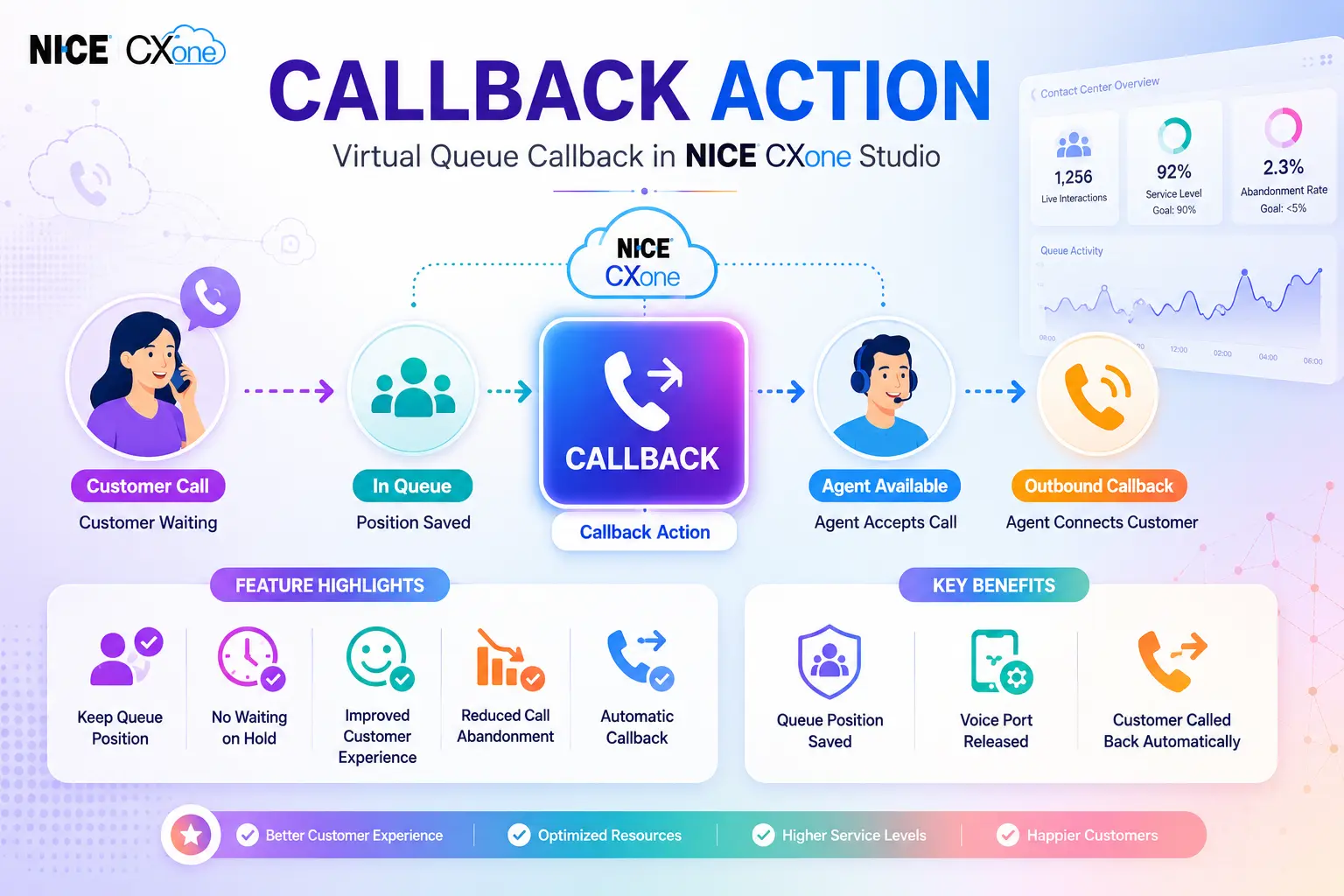
What is Callback?
The Callback Action in NICE CXone Studio allows callers to keep their place in the queue without waiting on the phone. Instead of remaining connected during long hold times, the caller can request a callback. When an agent becomes available and accepts the interaction, NICE CXone automatically places an outbound call back to the customer.
This feature improves customer experience by eliminating long wait times and reducing caller frustration.
How Callback Works
Callback Workflow
Visual Architecture of Callback
Why Use Callback?
Benefits:
- Better customer experience
- Reduced abandonment rates
- Improved satisfaction scores
Higher service levels
Callback Script Example Flow
Callback Detailed Process
Important Callback Dependencies
Caller Must Stay Connected
Keep Play Prompts Short
Recommended:
Thank you. Your place in queue has been saved. Please stay on the line while we process your callback request.
Avoid: Long 2-minute explanations that increase abandonment.
ANI and DNIS Behavior
Before Callback:
ANI = Customer Number DNIS = Contact Center Number
After Callback:
ANI = Callback CallerID DNIS = Callback Phone Number
Because values change:
Original ANI │ ▼ Save to Variable │ ▼ Execute Callback
Example:
ASSIGN OriginalANI = ANI ASSIGN OriginalDNIS = DNIS
Callback Action in NICE CXone Studio Queue Architecture
Benefits:
- Saves telephony resources
- Frees voice ports
- Reduces infrastructure usage
Voice Port Usage
Before Callback
Customer │ ▼ Voice Port Active
During Callback Queue State
Customer Disconnected │ ▼ No Port Consumed
During Returned Callback
Outbound Callback │ ▼ Voice Port Used
Callback Action in NICE CXone Studio Input Properties
Used to identify the action.
Examples:
Customer Callback VIP Callback Sales Callback Support Callback
PhoneNumber
Determines which number will receive the callback.
Examples:
{ANI}
Callback original caller.
Or:
{CustomerEnteredNumber}
Callback alternate number.
CallerID
Number displayed when callback is placed.
18005551212
Best practice:
Use the original number dialed by the customer.
CallDelaySec
Delay between:
Agent Accepts Call │ ▼ Callback Dialed
Maximum:
59 Seconds
Warning:
60+ Seconds
May place agents into Refused state.
Result Branch Conditions
Default
Normal successful execution.
Callback │ ▼ Default
OnError
Triggered when Callback cannot execute.
Examples:
- Connectivity issue
- Configuration problem
- Invalid settings
- Internal error
Error Flow
Callback and Contacttakeover
Callback works with:
Callback │ ▼ Contacttakeover
and
Querycallback
These actions help manage callback processing and retrieval.
Reporting and Billing
Reporting View
Callback │ ▼ Inbound Contact
Appears as:
Inbound Call
in Reporting.
Billing View
Callback Returned │ ▼ Outbound Call
Appears as:
Outbound Call
in Billing.
Callback Action in NICE CXone Studio Verification Process
To verify whether a callback occurred:
Reports │ ▼ Contact History │ ▼ Search Contact ID
Scenario 1: No Callback Made
Contact End Reason
Outbound Call Script Interrupted
Meaning:
❌ Callback not completed.
Scenario 2: Callback Attempted
Cause Code = 242
Meaning:
✔ Callback initiated using Contacttakeover.
Scenario 3: Callback Successful
Talk Time Populated
Meaning:
✔ Customer answered. ✔ Agent connected.
Scenario 4: No Answer
Talk Time Blank Cause Code 242
Meaning:
❌ Callback attempted. ❌ Customer did not answer.
Callback vs Waiting in Queue
| Feature | Waiting in Queue | Callback |
|---|---|---|
| Caller stays connected | ✅ | ❌ |
| Place in queue retained | ✅ | ✅ |
| Voice port used continuously | ✅ | ❌ |
| Customer can hang up | ❌ | ✅ |
| Agent receives interaction | ✅ | ✅ |
| Better customer experience | Moderate | Excellent |
Best Practices
Always
Offer callback after 30–60 seconds
Keep confirmation prompt short
Save ANI and DNIS before Callback
Use recognizable Caller ID
Test callback routing regularly
Avoid
Long callback prompts
Using unknown Caller IDs
Losing original ANI values
Delays above 59 seconds
Conclusion
The Callback Action in NICE CXone Studio is a valuable feature that enhances the customer experience by allowing callers to retain their position in the queue without remaining on hold. Instead of waiting for extended periods, customers can request a callback and continue with their daily activities while NICE CXone automatically reconnects them when an agent becomes available.
By reducing hold times, lowering call abandonment rates, and optimizing voice port usage, the Callback Action in NICE CXone Studio helps contact centers improve operational efficiency and customer satisfaction. Features such as queue position retention, customizable Caller ID, ANI and DNIS handling, and integration with Contacttakeover and Querycallback actions make it a powerful solution for modern contact centers.
When implemented correctly, with proper callback prompts, queue management, and reporting verification, the Callback Action in NICE CXone Studio can significantly improve service levels while providing a seamless and convenient experience for both customers and agents - NICE CX Training | VoipTrainers.