BlindXfer Action in NICE CXone Studio – Complete Guide
 VoIP Trainers4 min read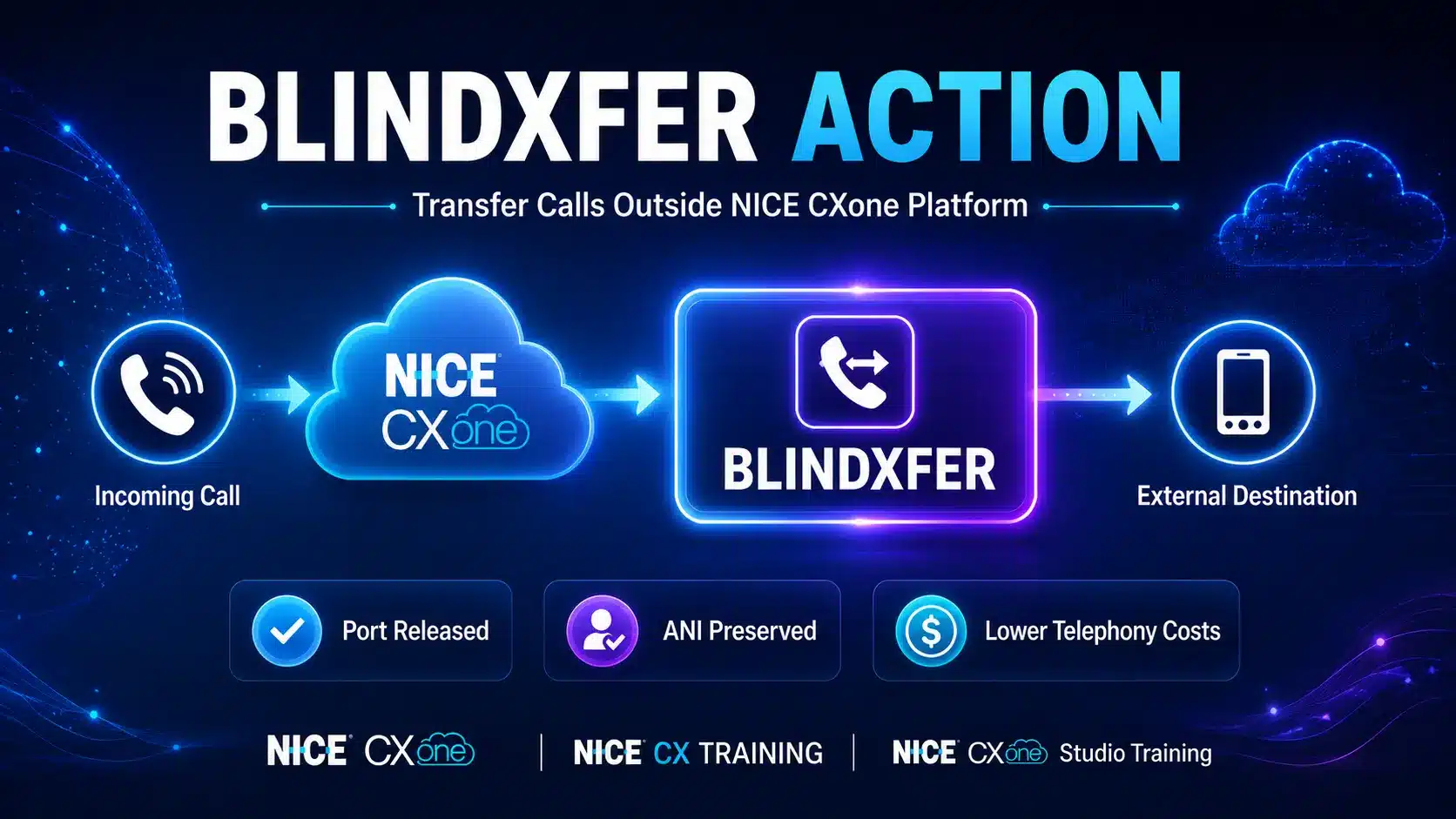
What is BlindXfer Action in NICE CXone Studio?
BlindXfer is a NICE CXone Studio action used to transfer an active call to another telephone number without maintaining control of the call inside the NICE CXone platform.
Once the transfer is completed:
- The call leaves the NICE CXone environment.
- NICE CXone ports are released.
- Call recording stops.
- Reporting stops.
- Call monitoring is no longer available.
- The transferred call continues directly between the caller and destination.
BlindXfer is commonly used for:
- After-hours call routing
- Emergency forwarding
- External vendor transfers
- On-call technician routing
- Holiday call handling
BlindXfer Action in NICE CXone Studio
Supported Script Types
Script Example
In this script, Begin triggers the Hours action. If the Hours of Operation profile settings show the contact center to be open, the call is delivered to an agent. If the contact center is closed or on holiday, Blindxfer routes the call to [example phone number] 8015551212 (set in the Blindxfer properties) to be handled.
BlindXfer Action in NICE CXone Studio Call Flow Diagram
How BlindXfer Works
When a caller reaches your contact center and the script determines that the call should be routed elsewhere:
After the transfer:
- NICE CXone is no longer involved.
- The destination party sees the original caller’s phone number.
Contact center resources are freed.
BlindXfer Architecture Diagram
Why Use BlindXfer Action in NICE CXone Studio?
1. Reduce Port Usage
After transfer:
Before Transfer -––––––– Caller ↔ CXone Port
After BlindXfer -––––––– Caller ↔ Destination
CXone Port Released
Benefits:
- Lower telephony costs
- Better resource utilization
- Reduced concurrent port consumption
2. Route Calls Outside CXone
Examples:
- Answering services
- Emergency support teams
- Mobile phones
- Third-party vendors
- Branch offices
3. Preserve Caller ID (ANI)
The recipient sees:
Caller Number: +1 555-123-4567
instead of:
CXone Number
This helps the recipient identify the actual caller.
Important BlindXfer Action in NICE CXone Studio Limitations
After BlindXfer Action in NICE CXone Studio executes:
| Feature | Available? |
|---|---|
| Call Recording | No |
| Monitoring | No |
| Reporting | No |
| Call Control | No |
| Port Usage | No |
| Billing for Port | No |
BlindXfer Process Diagram
Dependency Requirements
SIP Headers
If custom SIP headers are required:
SIPXFERPUTHD │ ▼ BlindXfer
Use:
SIPXFERPUTHD Action
before
BlindXfer Action
to attach custom SIP headers.
ISUP OLI Forwarding
What is ISUP OLI?
ISUP OLI (Originating Line Information) provides information about the original caller.
Sometimes organizations need this information forwarded to the transferred destination.
What is ISUP OLI?
ISUP OLI (Originating Line Information) provides information about the original caller.
Sometimes organizations need this information forwarded to the transferred destination.
ISUP OLI Forwarding Workflow
Required SNIPPET Code
Place a SNIPPET action before BlindXfer:
ASSIGN global:forward_source_uri_params = “isup-oli”
Script Layout
BlindXfer Action in NICE CXone Studio Input Properties
Caption
Used to identify the action on the Studio canvas.
Example:
After Hours Transfer Emergency Routing Holiday Transfer
Destination
The phone number receiving the transferred call.
Example:
8015551212
or +18015551212
Result Branch Conditions
OnDialingError
Triggered when:
- Number unreachable
- Carrier issue
- Network failure
- Invalid destination
BlindXfer and OnRelease
When BlindXfer executes:
BlindXfer │ ▼ OnRelease Triggered
This allows cleanup activities.
Examples:
- Database updates
- Logging
- CRM updates
- Contact history storage
OnRelease Example
BlindXfer │ ▼ OnRelease │ ├─ Write DB Record ├─ Store Contact History ├─ Update CRM └─ End Script
BlindXfer Action in NICE CXone Studio vs Transfer vs PlaceCall
| Feature | BlindXfer | Transfer | PlaceCall |
|---|---|---|---|
| Transfers Existing Call | ✅ | ✅ | ❌ |
| Uses CXone Ports After Transfer | ❌ | ✅ | ✅ |
| Recording Continues | ❌ | ✅ | Depends |
| Reporting Continues | ❌ | ✅ | Separate Script |
| Monitoring Available | ❌ | ✅ | Separate Script |
| Creates New Outbound Call | ❌ | ❌ | ✅ |
| Billing Continues | ❌ | ✅ | ✅ |
Visual Comparison
Real-World Example: After-Hours Routing
A company receives calls 24/7.
Business hours:
- Monday–Friday
- 9 AM–6 PM
Outside business hours: Calls should go to an answering service.
Script Flow
Complete Script Example
Key Takeaways
Transfers calls to an external number
Releases NICE CXone ports immediately
Stops recording and reporting
Reduces telephony costs
Preserves original caller ID (ANI)
Triggers OnRelease event
Supports ISUP OLI forwarding using:
ASSIGN global:forward_source_uri_params = “isup-oli”
Ideal for after-hours, emergency, and third-party call routing
❌ NICE CXone can no longer monitor, record, or report on the call after transfer
Conclusion
The BlindXfer Action in NICE CXone Studio is a powerful call-routing tool that enables contact centers to transfer active calls to external destinations while immediately releasing NICE CXone resources. It is especially useful for after-hours support, emergency call forwarding, third-party vendor routing, and business continuity scenarios. By freeing CXone ports, organizations can reduce telephony costs and improve resource utilization. Additionally, BlindXfer Action in NICE CXone Studio preserves the original caller ID (ANI), ensuring a seamless experience for the recipient.
However, because the call leaves the NICE CXone platform after the transfer, recording, monitoring, reporting, and call control capabilities are no longer available. Understanding these limitations and configuring features such as ISUP OLI forwarding and OnRelease processing can help administrators implement BlindXfer Action in NICE CXone Studio effectively. By mastering the BlindXfer Action in NICE CXone Studio, contact center professionals can build efficient, cost-effective, and flexible call-routing solutions that meet a wide range of business requirements - NICE CX Training | VoipTrainers.