Bleeplog Action in NiCE CXone Studio – Complete Guide
 VoIP Trainers4 min read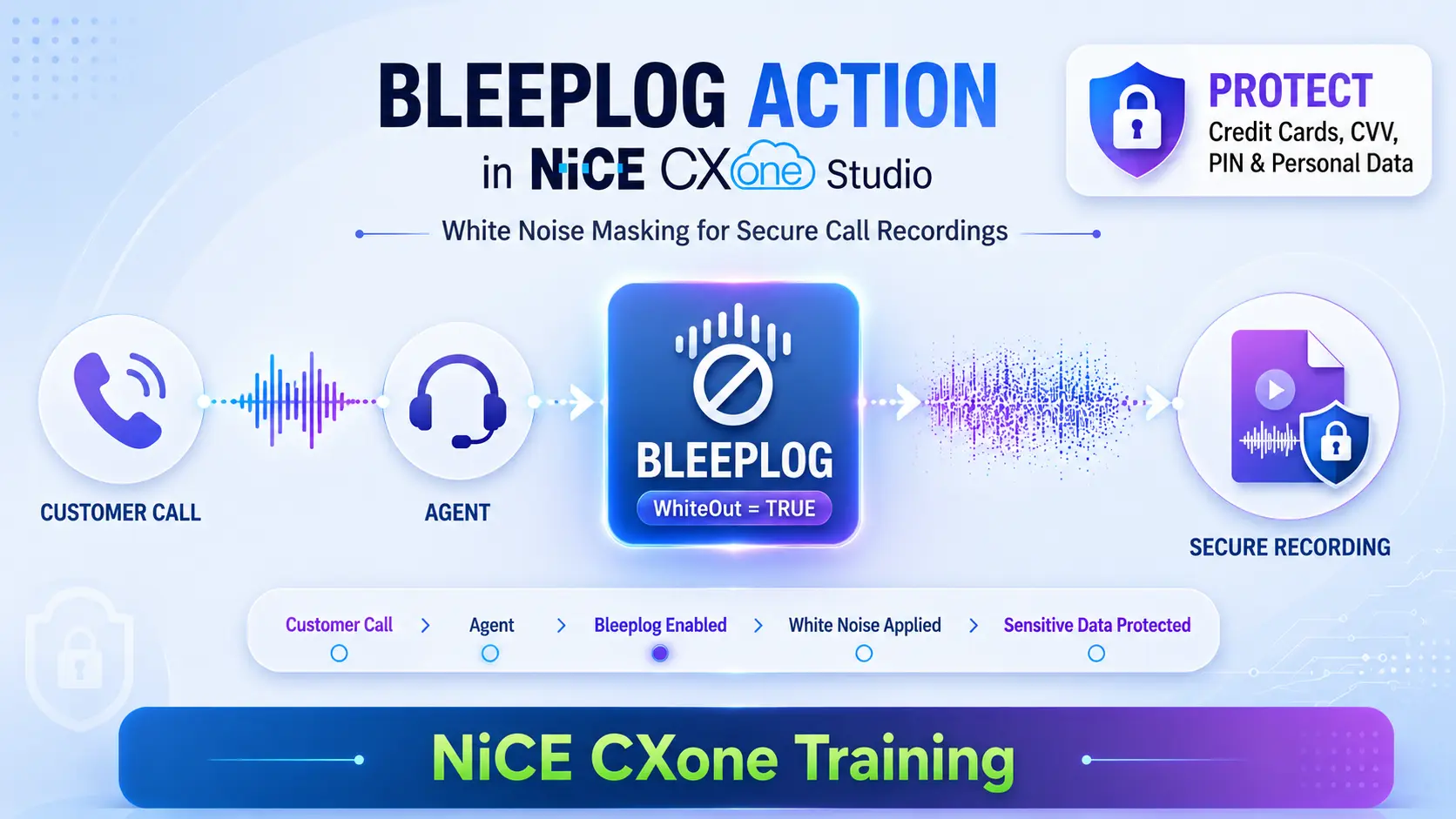
What is Bleeplog Action in NICE CXone Studio?
Bleeplog is a NiCE CXone Studio action used to apply white noise masking over a specific portion of a recorded phone call. It helps contact centers protect sensitive customer information such as:
- Credit Card Numbers
- CVV Numbers
- Bank Account Details
- Social Security Numbers
- Personal Identification Information (PII)
- Passwords and PINs
When Bleeplog is enabled, the actual conversation is replaced with white noise in the recording, preventing anyone from listening to confidential information later.
Bleeplog
Supported Script Types
Why Use Bleeplog Action in NICE CXone Studio?
Many contact centers record customer interactions for:
- Quality Monitoring
- Compliance
- Training Purposes
- Auditing
However, recording sensitive payment information can create security and compliance risks.
Bleeplog helps organizations comply with:
- PCI-DSS Requirements
- Data Protection Policies
- Privacy Regulations
Input Properties
Caption
A custom label displayed below the action icon in Studio.
Example:
Enable Payment Masking
WhiteOut
Controls whether white noise masking is enabled.
| Value | Description |
|---|---|
| True | Starts masking audio |
| False | Stops masking audio |
Example:
WhiteOut = True
Result:
The recording contains white noise instead of the customer’s sensitive information.
Result Branch Conditions
Default Branch
The Default branch executes when:
- No other branch condition exists.
- No exception occurs.
- The action completes normally.
Bleeplog ↓ Default
How Bleeplog Action in NICE CXone Studio Works
Normal Call Flow
Without Bleeplog:
Customer Calls ↓ Agent Answers ↓ Conversation Recorded ↓ Sensitive Data Spoken ↓ Sensitive Data Saved in Recording
Problem
Anyone with recording access can hear:
Card Number CVV PIN Bank Details
Secure Call Flow Using Bleeplog
Customer Calls ↓ Agent Answers ↓ Recording Starts ↓ Customer Gives Card Details ↓ Bleeplog Enabled ↓ White Noise Recorded ↓ Card Information Protected ↓ Bleeplog Disabled ↓ Normal Recording Continues
Bleeplog vs Recording Masking
| Feature | Bleeplog | Traditional Masking |
|---|---|---|
| Uses White Noise | Yes | No |
| Hides Sensitive Data | Yes | Yes |
| Works During Recording | Yes | Depends |
| Agent Controlled | Yes | Sometimes |
| Dynamic On/Off | Yes | Limited |
Important Note
Bleeplog is not exactly the same as Masking.
Although both protect sensitive information, Bleeplog specifically inserts white noise into the recording.
Example Business Scenario
Credit Card Payment Collection
Customer calls customer service.
Conversation
Agent: May I have your card number?
Customer: 4111-1111-1111-1111
Before customer starts speaking card information:
Bleeplog = True
Recording contains:
hhhhhhhhhhhhhhhhh (white noise)
After payment details are completed:
Bleeplog = False Recording resumes normally.
Understanding the Example Script
The Bleeplog Action in NICE CXone Studio script works using:
Actions Used
- Runsub
- If
- Assign
- Indicate
- Bleeplog
Step 1 – Call Answered
OnAnswer Event ↓ Runsub ↓ BLEEP = FALSE
The script checks whether masking is already active.
Step 2 – First IF Check
IF BLEEP = TRUE
Since this is the first execution:
BLEEP = FALSE
The FALSE branch executes.
Step 3 – Enable Agent Button
Assign BLEEP = TRUE ↓ Indicate Action
The Indicate action displays a custom button inside the agent interface.
Agent View
[ Start Secure Recording ]
Step 4 – Agent Clicks Button
When customer starts sharing payment information:
Agent Clicks Button ↓ OnSignal Event ↓ Runsub Executes Again
Step 5 – Start White Noise
This time:
BLEEP = TRUE
Therefore:
Assign BLEEP = FALSE ↓ Bleeplog WhiteOut = True
White noise starts.
Agent View
[ Stop Secure Recording ]
Step 6 – Customer Gives Sensitive Information
Card Number CVV PIN
Recording captures:
White Noise Only
Step 7 – Agent Stops Bleeplog
After collecting sensitive information:
Agent Clicks Button Again ↓ OnSignal Event ↓ Runsub
Now:
BLEEP = FALSE
The script executes:
Bleeplog WhiteOut = False
Normal recording resumes.
Complete Workflow Diagram
Visual Architecture
Best Practices
Enable Bleeplog Action in NICE CXone Studio only when sensitive information is being shared.
Clearly train agents on when to activate and deactivate masking.
Use meaningful captions such as:
Start PCI Mode Stop PCI Mode Secure Recording Payment Protection
Test recordings regularly to verify white noise is properly applied.
Combine Bleeplog Action in NICE CXone Studio with PCI-DSS compliance procedures.
Conclusion
- Bleeplog Action in NICE CXone Studio replaces portions of recordings with white noise.
- Helps protect payment and personal information.
- Controlled through the WhiteOut property.
- Often used with Runsub, If, Assign, and Indicate actions.
- Agents can dynamically turn masking ON and OFF during a live call.
- Supports compliance and secure call recording practices in NiCE CXone environments.
This action is especially valuable in payment-processing contact centers where customer card information must never be exposed in call recordings - NICE CX Training | VoipTrainers.