Attach Action in NICE CXone Studio – Complete Guide with Examples and Diagrams
 VoIP Trainers6 min read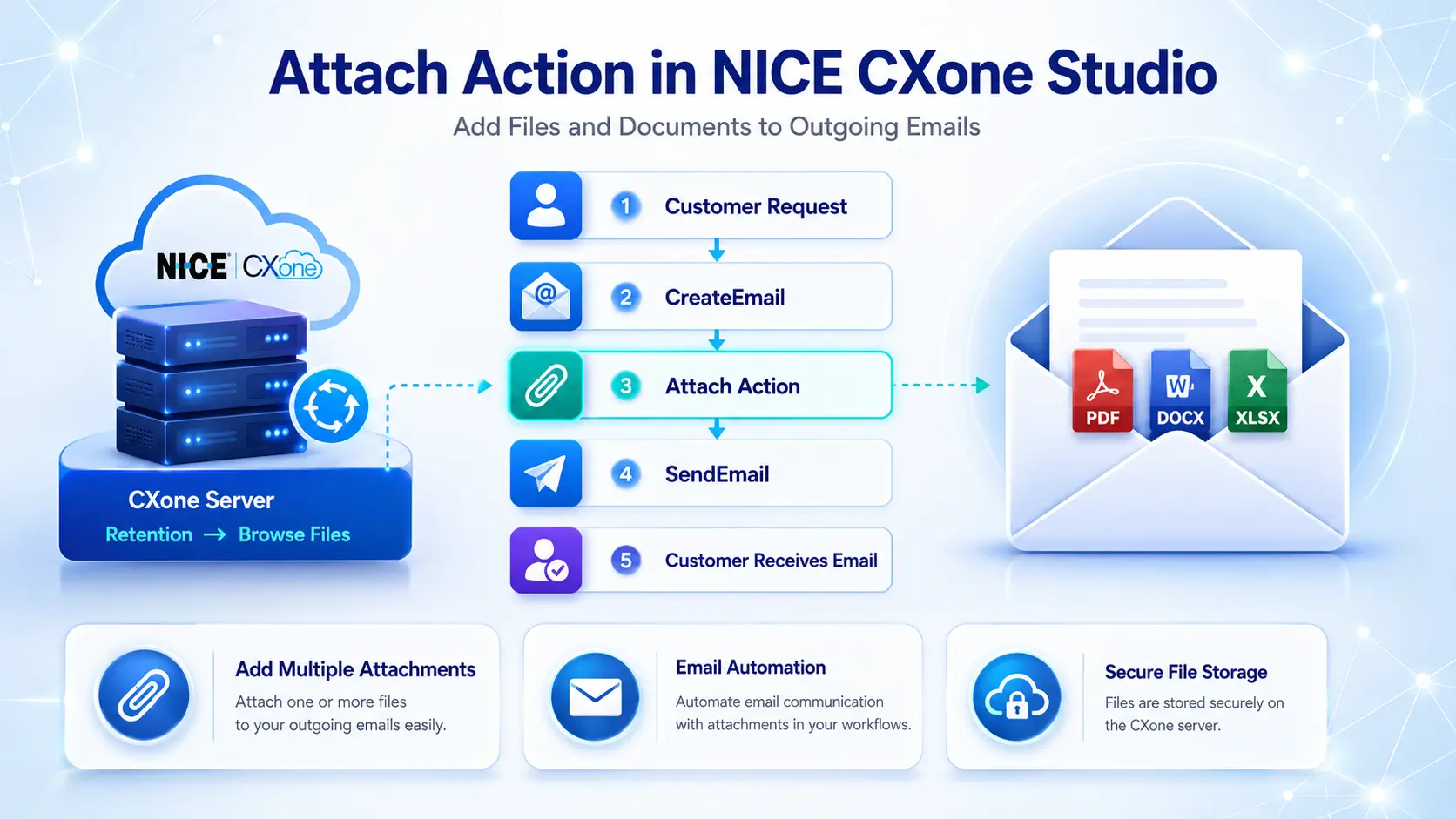
What is the Attach Action?
The Attach Action in NICE CXone Studio allows administrators to add files to outgoing emails and improve document delivery workflows.
The Attach Action in NICE CXone Studio is used to add one or more files as email attachments when sending emails through an Email script.
Before an email is sent using the SendEmail action, the Attach action allows you to include documents, images, PDFs, spreadsheets, or any other file stored on the CXone server.
Think of the Attach action as:
“Adding a file to an email before it is delivered to the customer.”
For example:
- Attach Action an invoice PDF.
- Attach Action a company brochure.
- Attach Action a product catalog.
- Attach Action a support document.
- Attach Action screenshots or images.
Attach Action in NICE CXone Studio
Supported Script Types
How Attach Action Works
Process Flow
Workflow
- Customer requests information.
- Studio creates an email structure using CreateEmail.
- Attach action adds a file.
- SendEmail action sends the email.
- Customer receives the email with attachment.
Script Flow
Dependency Requirements
Before using the Attach action:
Important Requirement
The file must already exist on the NICE CXone server.
To upload files:
- Login to CXone.
- Open ACD.
- Navigate to:
Retention ↓ Browse Files
- Upload the file.
Once uploaded, the file can be referenced in the Attach action.
Supported File Types
The Attach action supports virtually all file types.
Examples:
| File Type | Example |
|---|---|
| Invoice.pdf | |
| Word | Manual.docx |
| Excel | Report.xlsx |
| Image | Logo.png |
| Text | Notes.txt |
| ZIP | Files.zip |
There is no specific limitation on outgoing email attachment file types.
Supported Script Type
The Attach action works only with:
📧 Email Scripts
Example
Email Script ↓ CreateEmail ↓ Attach ↓ SendEmail
Example
1. Caption
Description
Caption is a custom label used to identify the action in the script.
Example
Attach Action Invoice
or
Attach Product Brochure
This name appears below the action icon on the Studio canvas.
2. ContainerVar
Description
ContainerVar specifies the structured variable that contains the email information.
Default value:
EML
This variable is usually created by the CreateEmail action.
Example
ContainerVar = EML
3. Filename
Description
Specifies the path and file name to be attached.
Example
Invoice.pdf
or
Documents/ProductGuide.pdf
Sample Configuration
Properly configuring the Attach Action in NICE CXone Studio ensures that files are attached successfully before emails are sent.
Filename = Invoice2025.pdf
When the email is sent, this file is attached automatically.
4. Replace
Description
Replace is a Boolean property.
It determines whether existing attachments should be replaced.
Values
| Value | Meaning |
|---|---|
| False | Add new attachment to existing list |
| True | Remove existing attachment and replace it |
Example
Replace = False
Attachment 1 = Brochure.pdf Attachment 2 = Pricing.pdf
Result:
Customer receives both files.
Replace = True
Attachment 1 = Brochure.pdf Replace = True Attachment 2 = Pricing.pdf
Result:
Only Pricing.pdf is sent.
Example Script
A customer requests a product catalog.
Studio Flow
Begin ↓ CreateEmail ↓ Attach ↓ SendEmail ↓ End
Configuration
CreateEmail
To = customer@email.com Subject = Product Catalog
Attach
ContainerVar = EML Filename = ProductCatalog.pdf Replace = False
SendEmail
Uses EML variable
Result:
Customer receives:
Subject: Product Catalog
Attachment: ProductCatalog.pdf
Multiple Attach Actions
You can use multiple Attach actions in a single script.
Example
Begin ↓ CreateEmail ↓ Attach Action Brochure.pdf ↓ Attach Action PriceList.pdf ↓ Attach Action Warranty.pdf ↓ SendEmail
Result
Customer receives:
- Brochure.pdf
- PriceList.pdf
Warranty.pdf
Result Branch Conditions
Default Branch
The Attach action contains a Default branch.
What It Does
The Default branch executes when:
- The attachment is added successfully.
- No alternate branch condition is defined.
- The script does not meet any special conditions.
Example
Attach ↓ Default ↓ SendEmail The script continues normally to the next action.
Real-World Use Cases
Many contact centers use the Attach Action in NICE CXone Studio to send invoices, reports, and policy documents automatically.
Organizations use the Attach Action in NICE CXone Studio to send invoices, quotations, reports, and policy documents automatically.
One of the key benefits of the Attach Action in NICE CXone Studio is the ability to attach multiple files before an email is sent.
The Attach Action in NICE CXone Studio helps organizations automate document delivery and improve customer communication.
Customer Support
Send:
- User manuals
- Troubleshooting guides
- Product documentation
Finance Team
Send:
- Invoices
- Receipts
- Payment confirmations
Sales Team
Send:
- Product catalogs
- Pricing sheets
- Quotations
HR Department
Send:
- Offer letters
- Employee documents
Policy manuals
Best Practices
Following best practices for the Attach Action in NICE CXone Studio can reduce errors and improve workflow efficiency.
When configuring the Attach Action in NICE CXone Studio, verify file paths and ensure all required documents are uploaded to the server.
Upload files to CXone before referencing them.
Use meaningful file names.
Verify file paths are correct.
Test attachment delivery before production deployment.
Use multiple Attach actions when sending several documents.
Keep attachment sizes reasonable to avoid email delivery issues.
Conclusion
Understanding the Attach Action in NICE CXone Studio is essential for administrators who manage email automation processes.
Learning the Attach Action in NICE CXone Studio can help administrators build more efficient email automation workflows.
The Attach Action is an important component in NICE CXone Studio that helps administrators include files and documents in email interactions. By using the Attach Action, organizations can send invoices, reports, brochures, PDFs, screenshots, and other supporting documents directly to customers without requiring manual intervention. The Attach Action works seamlessly with email scripts and improves communication efficiency by ensuring that the right files are delivered along with the message.
Understanding how the Attach Action functions can help contact center administrators build more effective email workflows. When configured correctly, the Attach Action enhances customer experience, reduces follow-up requests, and streamlines document delivery processes. Whether you are creating a simple email script or a complex customer service workflow, the Attach Action provides a reliable way to manage email attachments in NICE CXone.
By mastering the Attach Action, administrators can improve automation, increase productivity, and create professional email communications. Learning the Attach Action is therefore an essential step for anyone working with NICE CXone Studio and email-based customer interactions. For professionals looking to advance their contact center skills, gaining hands-on experience with the Attach Action can significantly improve script development and workflow management capabilities.
The Attach Action is a valuable feature in NICE CXone Studio that enables administrators to include files with email interactions. By using the Attach Action, businesses can send important documents such as invoices, brochures, reports, and support materials directly to customers through automated workflows.
Understanding the Attach Action helps contact center teams create more efficient and professional email communication processes. Proper configuration ensures that the correct files are delivered at the right time, improving both customer satisfaction and operational efficiency.
Whether you are new to NICE CXone Studio or an experienced administrator, learning how the Attach Action works can enhance your scripting capabilities and streamline document delivery. With the right implementation, the Attach Action becomes an essential part of building reliable email automation solutions.
As organizations continue to automate customer interactions, mastering the Attach Action can help improve productivity, reduce manual tasks, and create a better customer experience within NICE CXone Studio.
The Attach Action in NICE CXone Studio is used to add files to an outgoing email. It works together with the CreateEmail and SendEmail actions. Files must be uploaded to the CXone server beforehand, and multiple Attach actions can be used to include several documents in a single email. This action is commonly used for sending invoices, reports, manuals, brochures, and other customer-facing documents through automated email workflows - NICE CX Customized Training | VoipTrainers.