ASRDIGITS Action in NICE CXone Studio – Complete Guide with Diagrams
 VoIP Trainers3 min read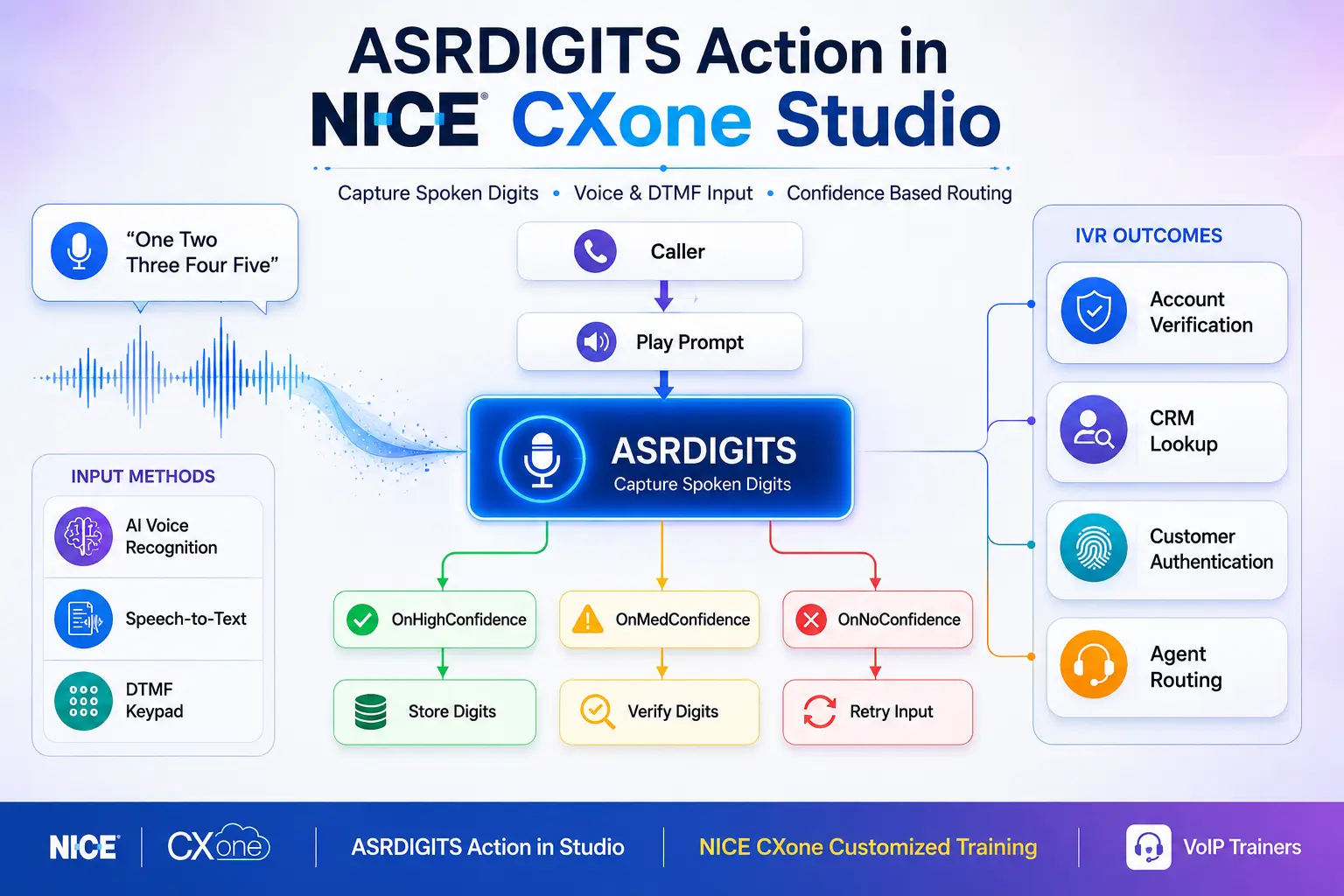
ASRDIGITS is a speech recognition action in NICE CXone Studio that captures spoken digits and stores them in a variable. It is commonly used for collecting account numbers, phone numbers, customer IDs, PINs, ticket numbers, and other digit-based information from callers.
What is ASRDIGITS ?
The ASRDIGITS action listens to callers speaking digits such as:
- Zero
- One
- Two
- Three
- Four
- Five
- Six
- Seven
- Eight
- Nine
For example:
Caller says:
“One Two Three Four Five”
Stored Result:
12345
Unlike ASRNUMBER, ASRDIGITS is designed specifically for individual digits rather than complete numbers.
When to Use ASRDIGITS
Use ASRDIGITS when callers need to provide:
| Use Case
|
Example
| | — | — | |
Account Number
|
123456789
| |
Customer ID
|
789654
| |
Phone Number
|
9876543210
| |
Employee ID
|
45678
| |
Ticket Number
|
789012
| |
Membership Number
|
100234
|
ASRDIGITS Call Flow Diagram
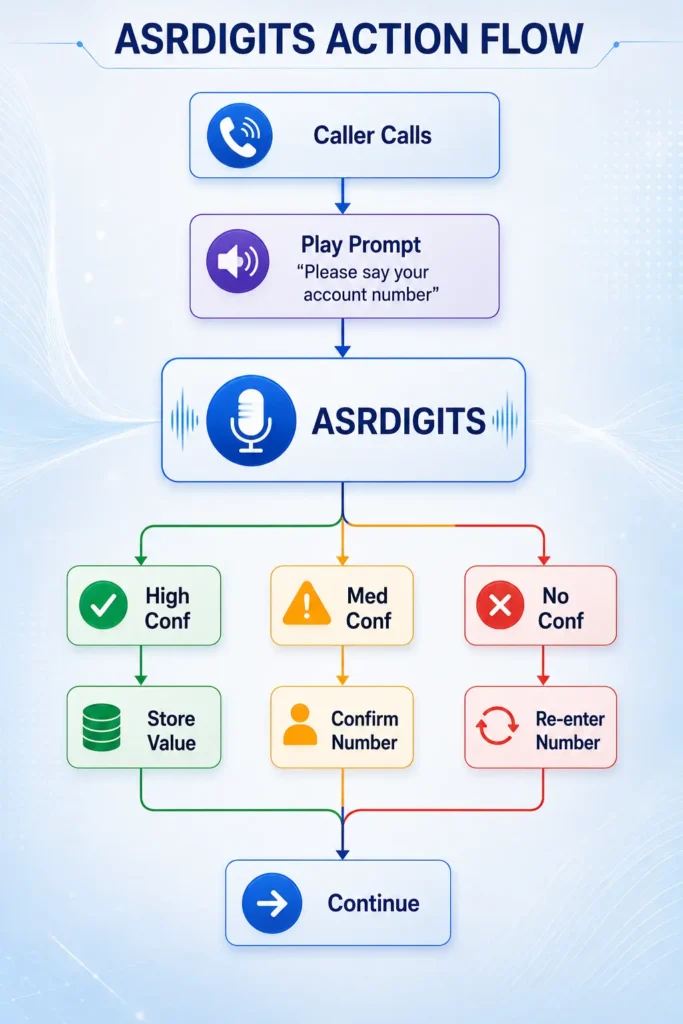
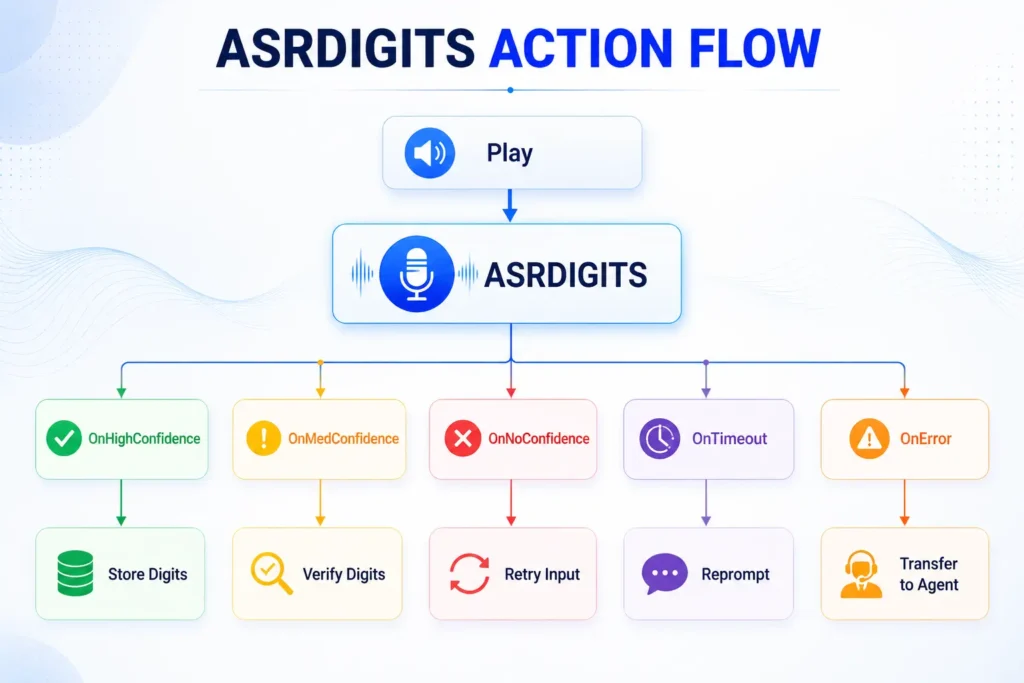
Supported Script Type

ASRDIGITS supports:
📞 Phone Scripts
It is mainly used within IVR applications for collecting caller information before routing calls to agents.
Input Properties of ASRDIGITS
- Caption
Used to provide a custom name for the action.
Example:
GetAccountNumber
Benefits:
- Easier script maintenance
- Better readability
- Sequence
Defines the prompt played to callers.
Example Using Audio File
“enter_account.wav”
Example Using Text-to-Speech
“%Please say your account number.”
The caller hears:
“Please say your account number.”
- Phrase
Used only for documentation purposes.
Example:
Please say your account number.
This property does not affect script execution.
- HighConfidence
Defines the confidence percentage required for automatic acceptance.
Default:
72%
Example:
HighConfidence = 80
If recognition confidence is 80% or higher:
OnHighConfidence
branch executes.
Confidence Decision Diagram
Recognition Result │ ▼ ┌───────────────┐ │ Confidence ? │ └───────┬───────┘ │ ┌───────┼────────┐ │ │ │ ▼ ▼ ▼
80% 50-79% <50% High Medium Low
- MinConfidence
Defines minimum acceptable confidence.
Default:
51%
Behavior:
| Confidence
|
Branch
| | — | — | |
Above HighConfidence
|
OnHighConfidence
| |
Between High and Min
|
OnMedConfidence
| |
Below Min
|
OnNoConfidence
|
- TimeoutSeconds
Determines how long the system waits for caller input.
Default:
10 seconds
Example:
TimeoutSeconds = 15
If caller remains silent:
OnTimeout
branch executes.
- ResultVarName
Stores recognized digits.
Example:
AccountNumber
Caller says:
One Two Three Four Five
Stored Value:
12345
- ConfidenceVarName
Stores recognition confidence score.
Default:
ASRConf
Example:
ASRConf = 87
- DetectDTMF
Allows keypad entry along with speech.
True
Accepts:
- Spoken digits
- DTMF digits
False
Accepts:
- Speech only
Voice + DTMF Hybrid Diagram
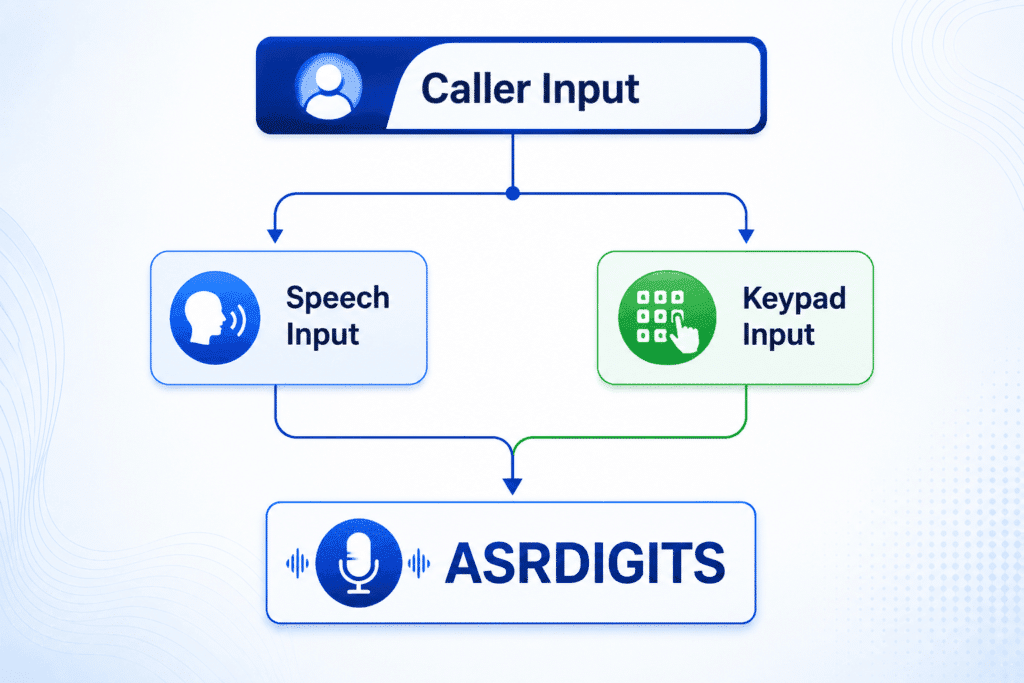
- ClearDigits
Controls DTMF buffer cleanup.
True (Default)
Clears old digits.
False
Keeps existing digits.
Recommended:
True
- InterDigitTimeout
Specifies wait time between DTMF digits.
Example:
3 Seconds
If exceeded:
OnInterDigitTimeout
branch executes.
- MinDigits
Minimum required digits.
Example:
Account Number:
MinDigits = 6
Caller enters:
1234
System continues waiting.
- MaxDigits
Maximum digits accepted.
Example:
MaxDigits = 10
When limit is reached:
OnMaxDigits
branch executes.
- TermDigit
Defines terminating key.
Common Value:
Example:
Caller enters:
123456#
System immediately processes input.
Result Branches
ASRDIGITS │ ├── Default ├── OnHighConfidence ├── OnMedConfidence ├── OnNoConfidence ├── OnTimeout ├── OnError ├── OnMaxDigits ├── OnTerminator └── OnInterDigitTimeout
Real-Time Banking Example
Scenario
Customer calls bank.
Need:
- Account Number
- Validate Number
- Route to Agent
Flow
Play “Please say your account number” │ ▼ ASRDIGITS │ ┌──────┼───────┐ │ │ │ ▼ ▼ ▼ High Med No │ │ │ │ ▼ ▼ │ Confirm Retry │ ▼ CRM Lookup │ ▼ Queue Agent
Best Practices
Use ASRDIGITS For
Account Numbers
Customer IDs
Phone Numbers
Ticket Numbers
PIN Numbers
Avoid ASRDIGITS For
Age
Salary
Currency
Large Numbers
Use ASRNUMBER instead for those cases.
Conclusion
ASRDIGITS Action in Studio is one of the most important speech-recognition actions in NICE CX IVR development. It allows callers to provide account numbers, phone numbers, customer IDs, and other digit-based information using either speech or keypad input. When configured with proper confidence levels, timeout settings, and DTMF handling, ASRDIGITS helps create intelligent and user-friendly IVR applications. For hands-on implementation and real-world IVR scenarios, VoIP Trainers offers NICE CXone Customized Training with practical labs, call-flow design, ASR configuration, and advanced Studio scripting.