ASRSQL Action in CXone Studio – Complete Guide with Diagrams
 VoIP Trainers4 min read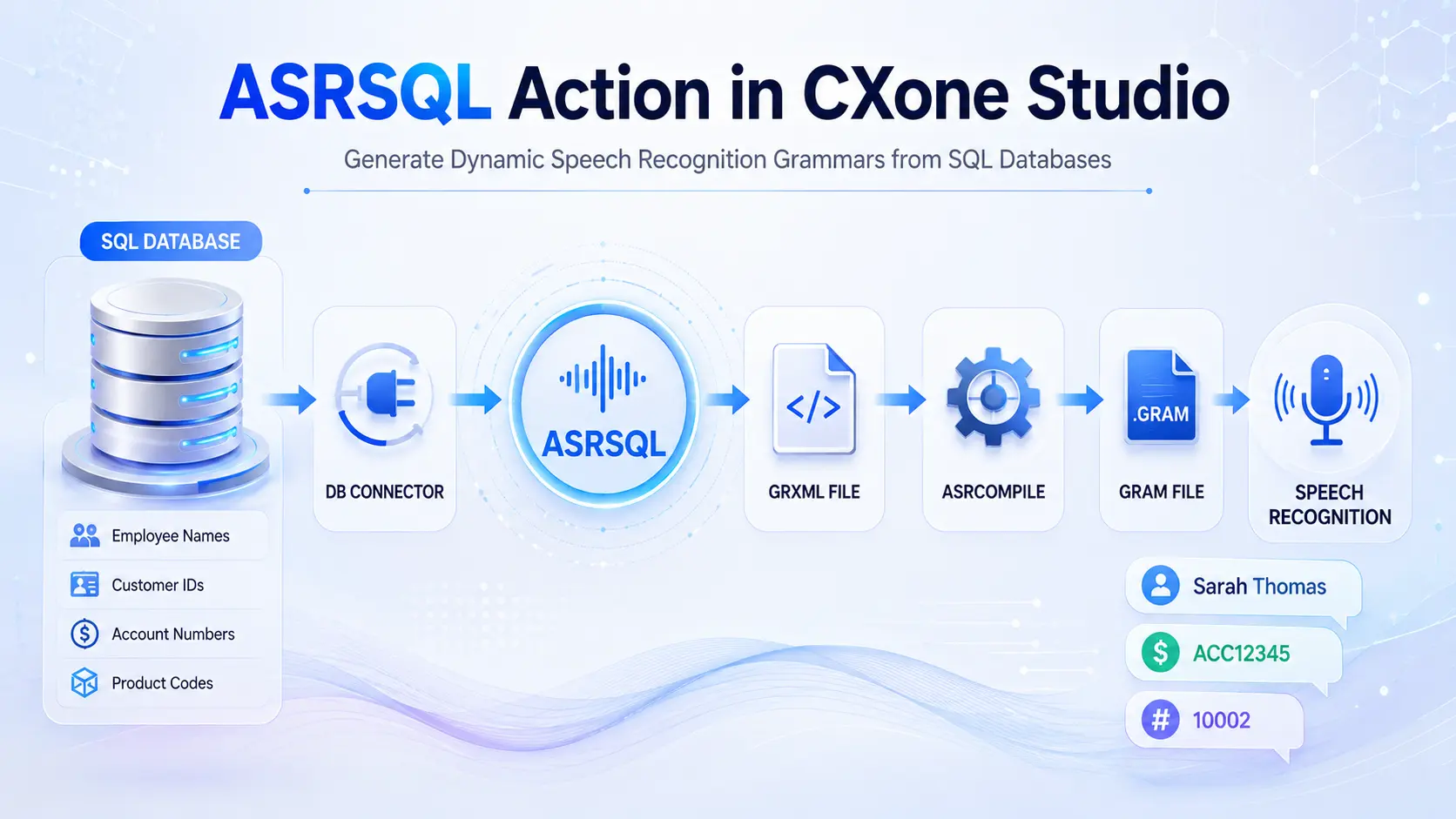
What is ASRSQL?
ASRSQL is a special Studio action used to create a dynamic speech recognition grammar (GRXML file) from data stored in a SQL database.
Instead of manually creating a grammar file containing thousands of names, account numbers, product IDs, or employee records, ASRSQL automatically reads data from your database and generates the grammar file.
Real-World Example
Imagine a company has:
- 50,000 customer names
- 10,000 employee names
- 25,000 product part numbers
Creating a speech grammar manually would be impossible.
ASRSQL solves this by:
- Connecting to the database
- Running a SQL query
- Extracting the data
- Creating a GRXML grammar file
- Using the grammar file for speech recognition
Why ASRSQL is Used
Without ASRSQL
Customer Says: “John Smith”
IVR must already know: John Smith Robert Jones David Wilson Sarah Thomas … 50,000 names
Manually maintaining this list is difficult.
With ASRSQL
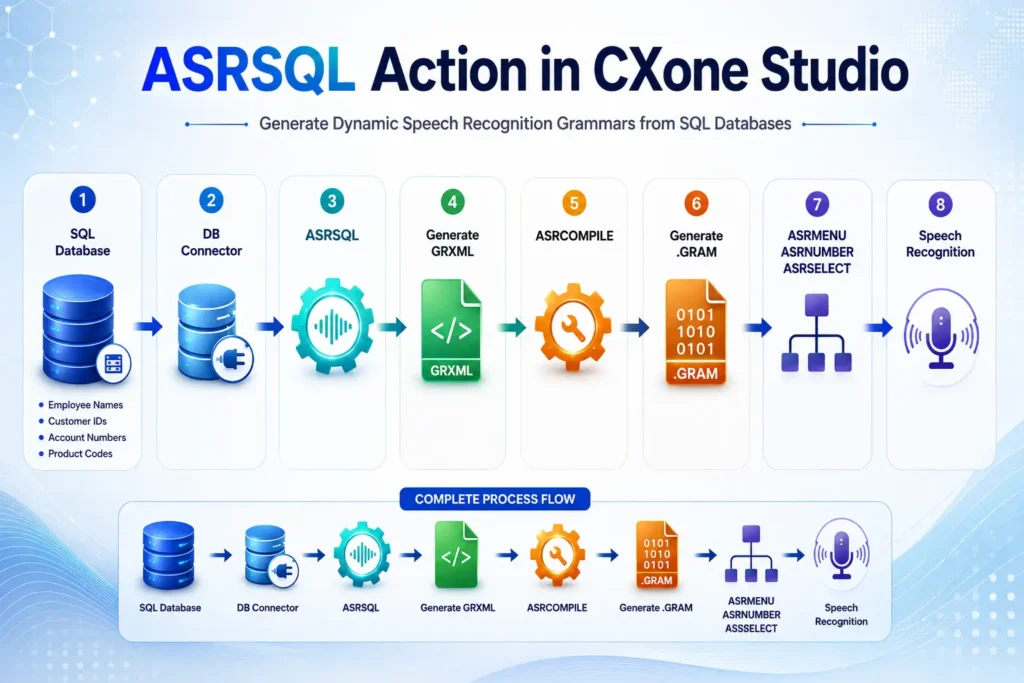
Database │ ▼ ASRSQL │ ▼ Generate GRXML │ ▼ ASRCOMPILE │ ▼ Speech Recognition
The grammar is automatically updated from the database.
ASRSQL Workflow
Example Scenario
Employee Directory
The company database contains:
| Employee Name
|
Department
|
Extension
| | — | — | — | |
John Smith
|
Sales
|
1001
| |
Sarah Thomas
|
HR
|
1002
| |
David Wilson
|
IT
|
1003
|
Caller says:
“Connect me to Sarah Thomas”
The IVR recognizes the name from the generated grammar.
Database Query
SELECT Name, Department, Extension FROM Employee_Table
What Happens?
ASRSQL reads:
John Smith Sarah Thomas David Wilson
and creates a grammar file.
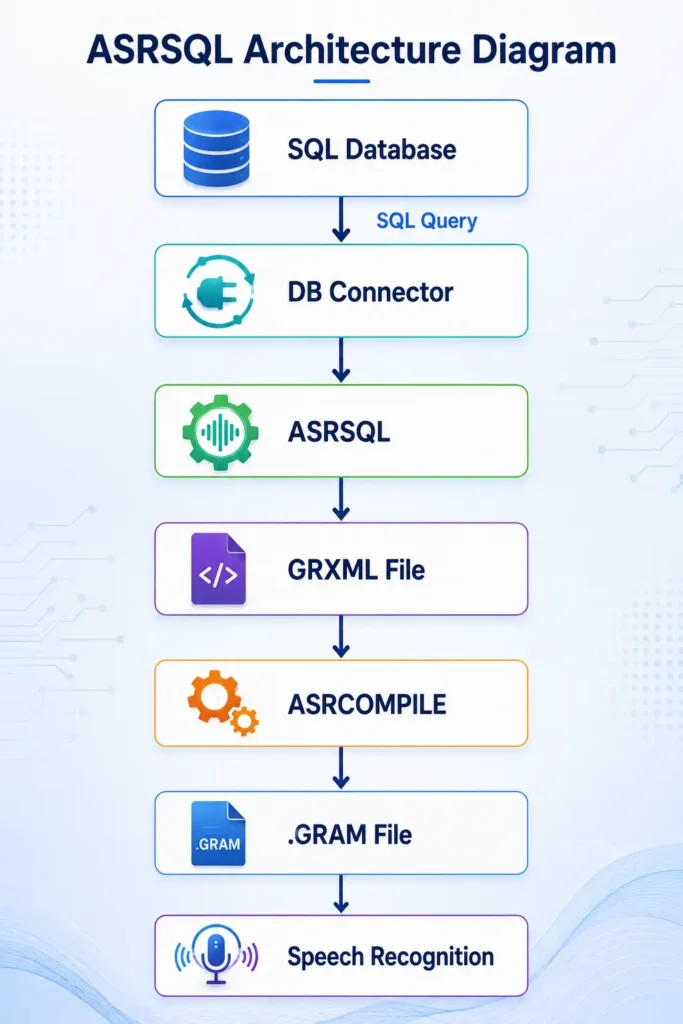
ASRSQL Architecture Diagram
ASRSQL Properties Explained
- Caption
Purpose
Custom name shown on Studio canvas.
Example
Build Employee Grammar
or
Generate Product Grammar
- GrammarFileName
Purpose
Specifies the GRXML file to generate.
Example
Employees.grxml
After compilation:
Employees.gram
Workflow
Employees.grxml │ ▼ ASRCOMPILE │ ▼ Employees.gram
- SpellRuleItems
Purpose
Converts spoken values into individual characters.
Default
True
Example
Without SpellRuleItems:
ABC123
Stored as:
ABC123
With SpellRuleItems = True
ABC123
Becomes:
A B C 1 2 3
Useful For
- Account Numbers
- Customer IDs
- Policy Numbers
- Product Codes
- Vehicle Numbers
Example
Customer says:
ACC12345
Recognition output:
A C C 1 2 3 4 5
Visual Example
Customer Speaks │ ▼ ACC12345 │ ▼ SpellRuleItems=True │ ▼ A C C 1 2 3 4 5
- IsOutputFormatted
Purpose
Formats generated GRXML into readable XML.
Default
True
False
True
Much easier to troubleshoot.
- SQLQuery
Purpose
Defines what data will be extracted.
Example Query
SELECT Name, Address, Phone_Number FROM dbo.User_Table WHERE ID > 0
Important Rule
The FIRST column becomes the speech recognition phrase.
SELECT Name, Address, Phone_Number
Here:
Name
is what callers can speak.
Returned Data
| Name
|
Address
|
Phone
| | — | — | — | |
John
|
NY
|
555111
| |
Sarah
|
TX
|
555222
|
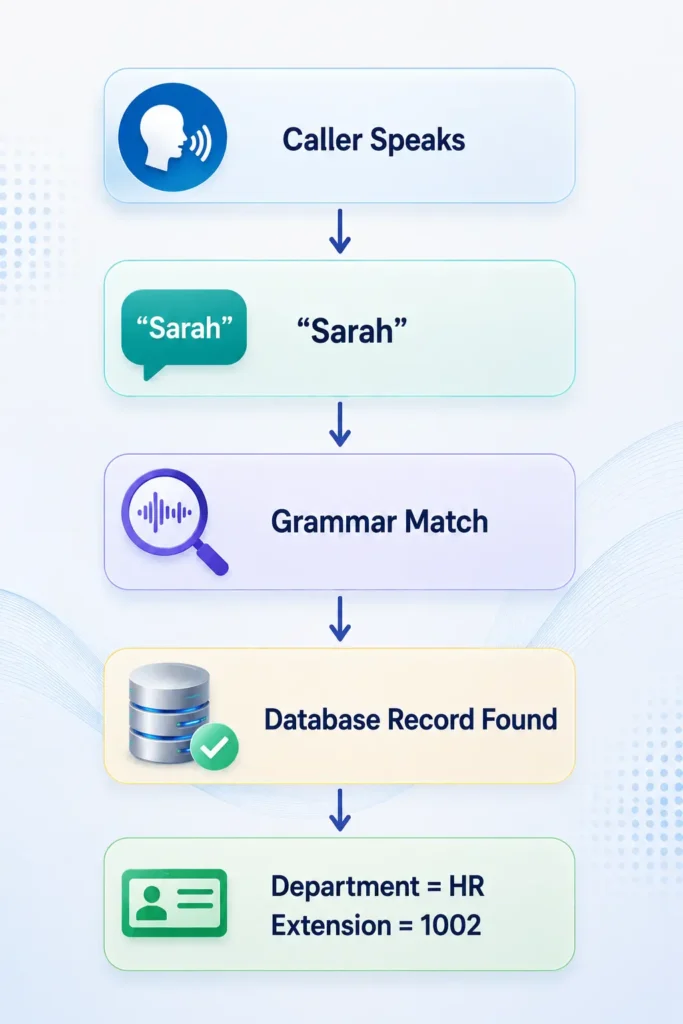
Caller says:
Sarah
ASR finds:
Sarah | TX | 555222
How Matching Works
- TimeoutSec
Purpose
Determines how long ASRSQL waits.
Default
10 Seconds
Example
TimeoutSec = 15
System waits:
15 seconds
If nothing happens:
OnTimeout Branch
Timeout Flow
ASRSQL │ ▼ Waiting… │ ├─ User Responds │ ▼ │ Continue │ └─ No Response ▼ OnTimeout
Result Branches
Default Branch
Used when processing succeeds.
ASRSQL │ ▼ Success │ ▼ Default
OnNoRecords
Triggered when SQL query returns no rows.
Example
SELECT * FROM Employee_Table WHERE EmployeeID = 999999
No matching employee exists.
Flow
Database │ ▼ 0 Records Returned │ ▼ OnNoRecords
OnError
Triggered when an error occurs.
Examples:
- Database Offline
- Wrong Credentials
- SQL Syntax Error
- Network Failure
Flow
Database Error │ ▼ ASRSQL │ ▼ OnError
_ERR Variable
Contains error details.
Example:
Connection timeout
or
Invalid SQL syntax
OnTimeout
Occurs when the action exceeds timeout settings.
Waiting… │ ▼ No Response │ ▼ OnTimeout
ASRSQL + ASRCOMPILE Relationship
ASRSQL only creates:
GRXML
ASRCOMPILE converts it into:
GRAM
usable by the speech engine.
Complete Production Workflow
Nightly Job │ ▼ ASRSQL │ ▼ Employees.grxml │ ▼ ASRCOMPILE │ ▼ Employees.gram │ ▼ Production IVR
Real Banking Example
Database:
| Account Number
|
Customer Name
| | — | — | |
10001
|
Ravi
| |
10002
|
Kumar
| |
10003
|
Priya
|
SQL:
SELECT Account_Number, Customer_Name FROM Customer_Master
Caller says:
10002
Grammar recognizes:
10002
and returns:
Customer Name = Kumar
Best Practices
Use ASRSQL When
Employee directories
Customer IDs
Product catalogs
Account numbers
Loan numbers
Policy numbers
Dynamic speech grammars
Avoid ASRSQL For
Simple menus
Small static grammars
Yes/No responses
Fixed IVR options
Use ASRMENU instead.
Conclusion
ASRSQL is a powerful CXone Studio action that dynamically generates speech recognition grammar files directly from SQL database records. Instead of manually maintaining large lists of employee names, customer IDs, account numbers, or product codes, ASRSQL automatically extracts data from a database and creates a GRXML grammar that can be compiled and used by speech-enabled IVR applications.
By integrating SQL Database → DB Connector → ASRSQL → GRXML → ASRCOMPILE → Speech Recognition, organizations can build scalable and accurate voice self-service solutions that stay synchronized with real-time business data. This approach reduces administrative effort, improves recognition accuracy, and ensures that IVR systems can recognize thousands of dynamic values without manual updates.
Whether used for employee directories, customer identification, product catalogs, policy numbers, or account lookups, ASRSQL provides a flexible and efficient method for creating dynamic speech recognition experiences within CXone Studio. Combined with ASRCOMPILE and other ASR actions, it forms the foundation of intelligent, database-driven voice automation solutions NICE CX Training - VoipTrainers.