ASRYESNO Action in NICE CXone Studio – Complete Guide with Examples & Diagrams
 VoIP Trainers3 min read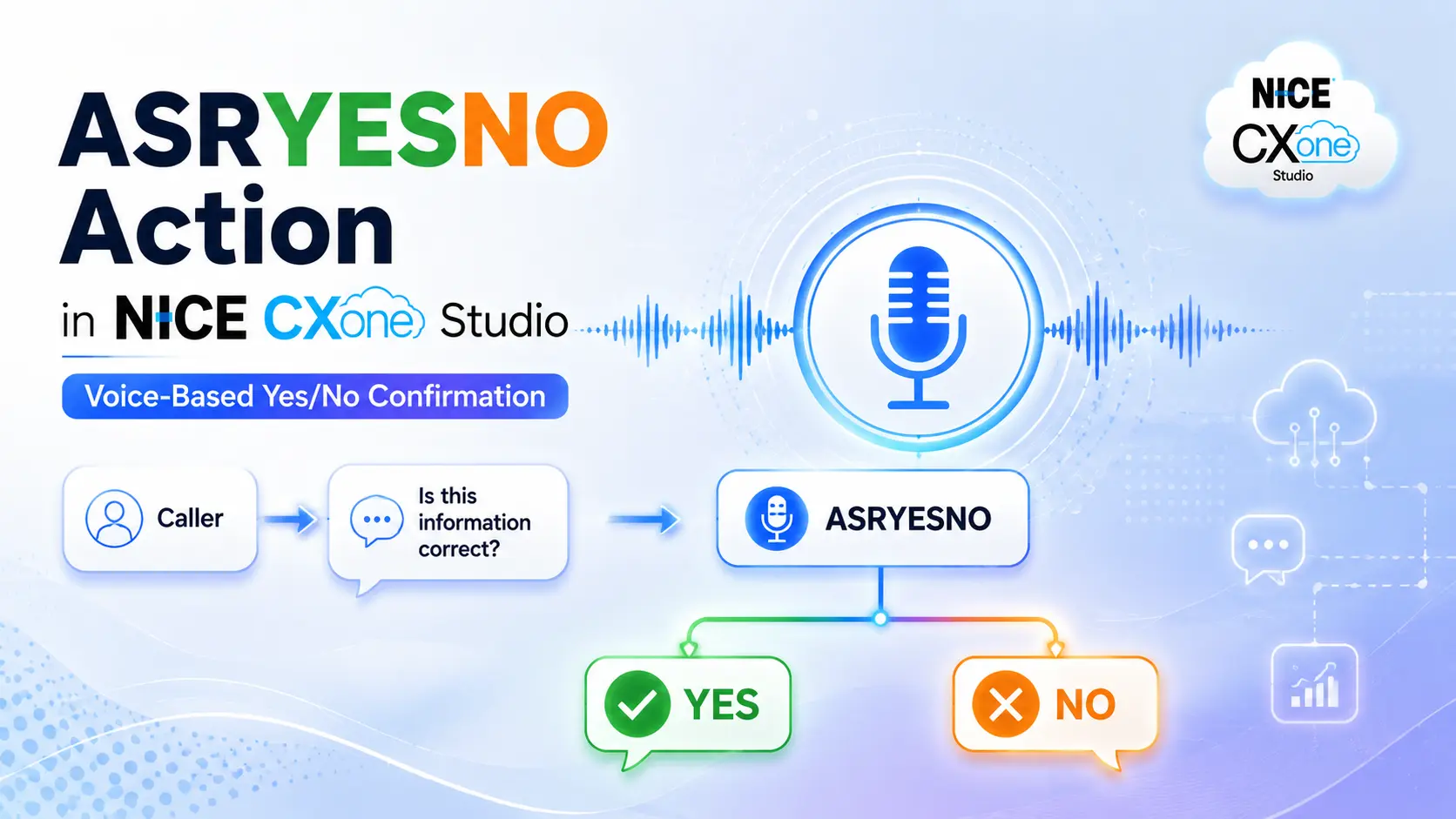
What is ASRYESNO?
ASRYESNO is an Automatic Speech Recognition (ASR) action in NICE CXone Studio that captures a caller’s Yes or No response and stores the result in a variable.
It is commonly used for:
- Order confirmation
- Appointment confirmation
- Customer verification
- Survey responses
- Consent collection
- Retry confirmations
Instead of pressing keys, callers can simply speak naturally.
Example
IVR Prompt:
“You entered account number 12345. Is this correct? Please say Yes or No.”
Caller says:
“Yes”
ASRYESNO recognizes the response and routes the call to the OnYes branch.
How ASRYESNO Works
ASRYESNO Call Flow Diagram
ASRYESNO Architecture Diagram
Supported Responses
ASRYESNO includes a built-in grammar file.
Responses Recognized as YES
Yes Yep Yup Sure Correct True Absolutely Okay
Responses Recognized as NO
No Nope Incorrect False Not Correct Never
This allows callers to speak naturally instead of memorizing exact words.
ASRYESNO Editor Configuration
1. Caption
Used to identify the action in the script.
Example
ConfirmDetails
2. Sequence
Defines the prompt played to the caller.
Example
“%You entered account number” “${AccountNumber}” “%Is this correct? Please say yes or no.”
Using Audio File
“ConfirmAccount.wav”
3. Phrase
Documentation field.
This field does not affect script execution.
Example
You entered account number. Is this correct?
4. MinConfidence
Specifies minimum confidence level required.
Default:
50
Example
| Confidence Returned | Result |
|---|---|
| 90% | OnYes/OnNo |
| 80% | OnYes/OnNo |
| 40% | OnNoConf |
5. TimeoutSeconds
Maximum wait time for caller response.
Default:
10 seconds
Example
TimeoutSeconds = 15
If caller remains silent for 15 seconds:
OnTimeout Branch
6. ResultVarNam
Stores recognized answer.
Example
ResultVarName = CustomerResponse
Possible values:
CustomerResponse = Yes CustomerResponse = No
7. ConfidenceVarName
Stores ASR confidence score.
Example
ConfidenceVarName = ASRConfidence
Possible value:
ASRConfidence = 92
8. DetectDTMF
Allows keypad input along with speech.
True
Caller says Yes OR Caller presses a key
False
Speech Only
Default:
False
9. ClearDigits
Clears old keypad entries from DTMF buffer.
Recommended
True
This prevents accidental key presses from previous actions affecting ASRYESNO.
10. Use1And2
Allows callers to press:
1 = Yes 2 = No
Example Prompt
If correct, say Yes or press 1. If incorrect, say No or press 2.
Important
Use1And2 = True DetectDTMF = False
Both options cannot be enabled simultaneously.
Result Branches Explained
OnYes Branch
Triggered when caller confirms.
Example
Caller: Yes
Flow:
ASRYESNO │ ▼ OnYes │ ▼ Continue Process
OnNo Branch
Triggered when caller rejects information.
Example
Caller: No
Flow:
ASRYESNO │ ▼ OnNo │ ▼ Re-enter Information
OnNoConf Branch
Triggered when ASR confidence is below threshold.
Example
Caller says:
Yeeeeaaaahhh
ASR confidence:
35%
MinConfidence:
50%
Result:
OnNoConf
OnTimeout Branch
Triggered when caller remains silent.
No Speech No DTMF
Result:
OnTimeout
OnDTMF Branch
Triggered when:
DetectDTMF = True
and caller presses a key.
Example:
Caller presses 5
Flow:
ASRYESNO │ ▼ OnDTMF
Use a Capture action after this branch to retrieve the digit.
OnError Branch
Triggered when:
- ASR service unavailable
- Syntax issues
- Connectivity problems
- Internal processing errors
Flow:
ASRYESNO │ ▼ OnError │ ▼ Agent Queue
Real-World Example – Banking IVR
Scenario
Customer enters account number.
Prompt
You entered account number 12345. Is this correct? Please say Yes or No.
Caller Says Yes
OnYes
Proceed to balance inquiry.
Caller Says No
OnNo
Return to account number entry.
Best Practices
Use Clear Prompts
Good
Is your mobile number correct? Please say Yes or No.
Bad
What do you think about that?
Set Appropriate Confidence Level
Recommended:
50–70
Always Handle Timeout
Connect:
OnTimeout
to a retry prompt.
Always Handle No Confidence
Connect:
OnNoConf
to clarification prompts.
Clear DTMF Buffer
Use:
ClearDigits = True
to avoid unexpected digit detection.
Key Benefits of ASRYESNO
Simple caller confirmation
Natural speech recognition
Faster IVR interactions
Reduced keypad dependency
Better customer experience
Built-in Yes/No grammar support
Supports voice and DTMF confirmation
Conclusion
The ASRYESNO action in NICE CXone Studio is designed to capture simple confirmation responses such as Yes or No using speech recognition. It includes built-in grammar recognition, confidence scoring, DTMF support, timeout handling, and multiple result branches. It is widely used in banking, healthcare, telecom, and customer service IVRs to confirm information before proceeding to the next step, creating a faster and more natural caller experience - NICE CX Training | VoipTrainers.