ASRMENU Action in Studio – Complete Guide for NICE CX Training
 VoIP Trainers5 min read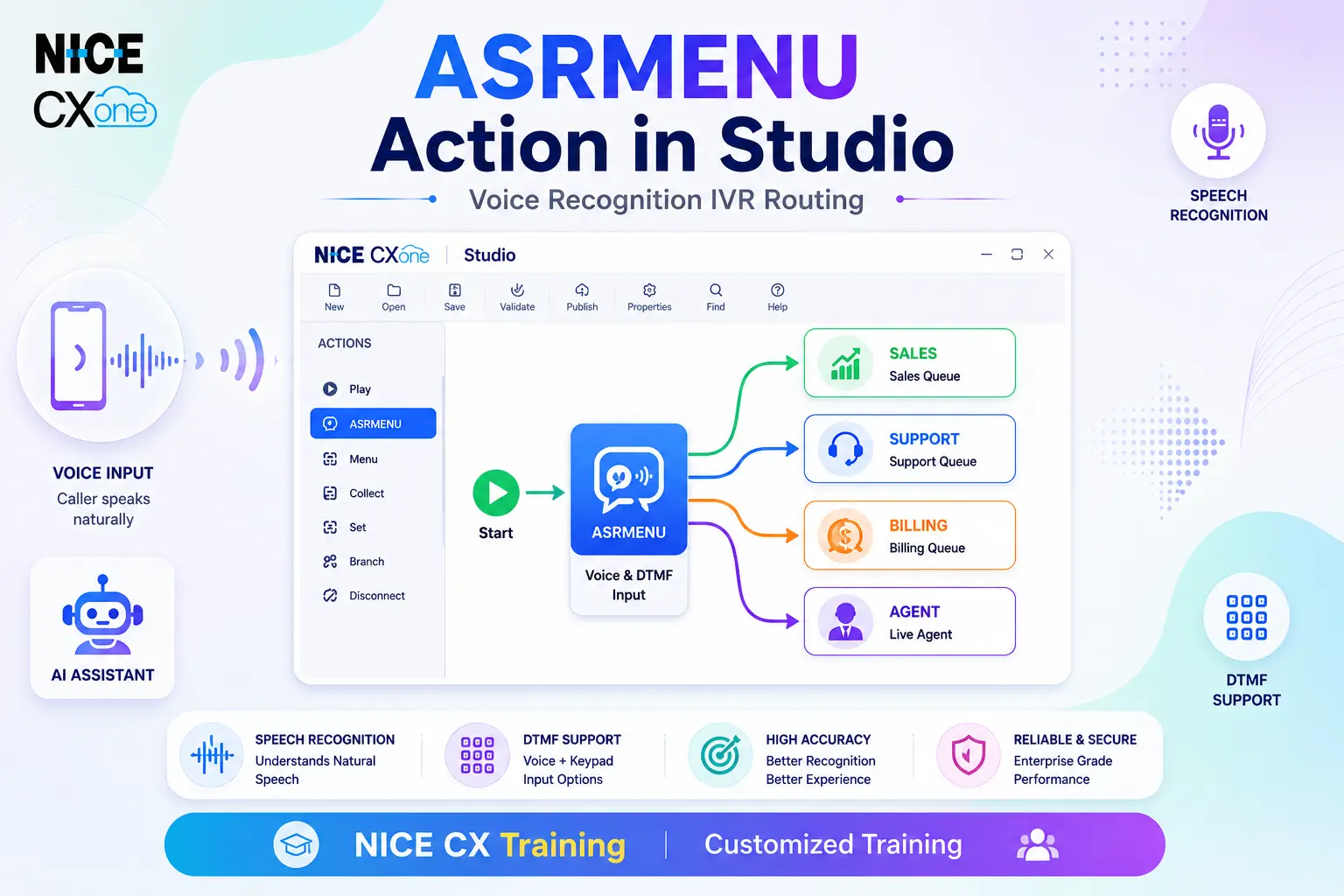
What is ASRMENU Action?
The ASRMENU Action in NICE CXone Studio is an advanced Automatic Speech Recognition (ASR) menu component that allows callers to interact with an IVR system using their voice instead of only keypad inputs. It helps organizations create intelligent self-service experiences by allowing customers to speak menu options naturally.
For example, instead of pressing “1” for Sales or “2” for Support, callers can simply say:
- “Sales”
- “Support”
- “Customer Service”
The ASRMENU action recognizes the spoken words and routes the call accordingly.
ASRMENU

Supported Script Types

Why ASRMENU is Important in NICE CXone Studio
Modern customers prefer speaking naturally rather than navigating lengthy IVR menus. ASRMENU improves customer experience by:
- Reducing call handling time
- Improving customer satisfaction
- Providing faster call routing
- Supporting both voice and DTMF input
- Creating intelligent IVR workflows
- Enhancing self-service automation
- Reducing agent workload
How ASRMENU Works
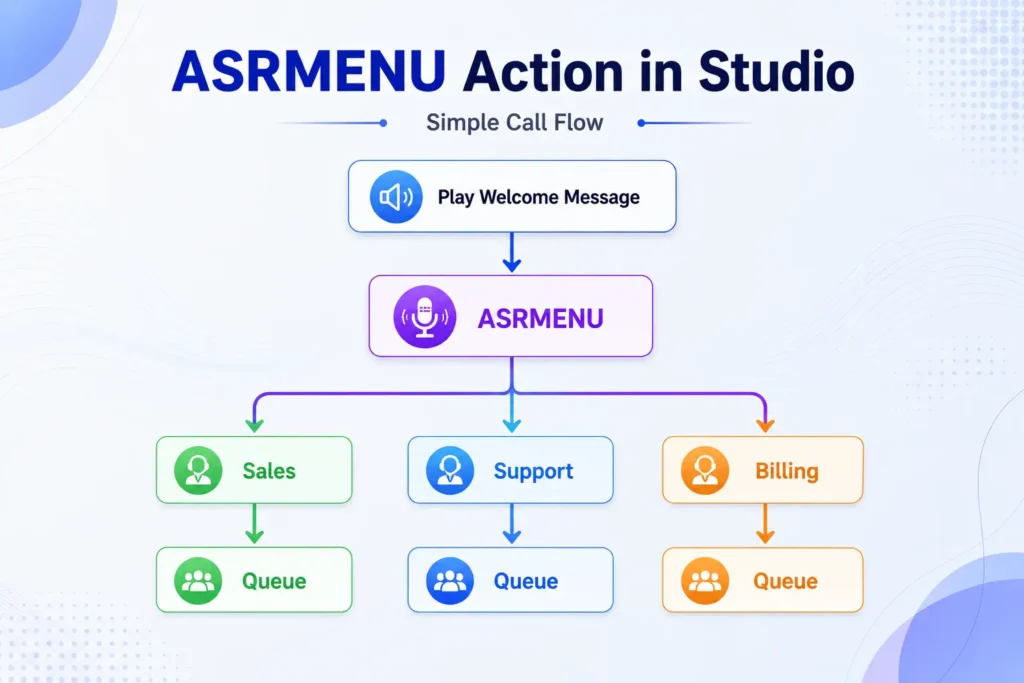
Example Prompt
Welcome to VoIP Trainers.
For Sales, say Sales. For Technical Support, say Support. For Billing, say Billing.
The caller speaks one of the options, and ASRMENU routes the call to the correct department.
Script Example 1
Asrmenu provides an easy way to create an ASR-driven menu system. It uses common branches such as OnNoConfidence and OnTimeout, but allows the user to specify their own branches for specific phrases. For example:
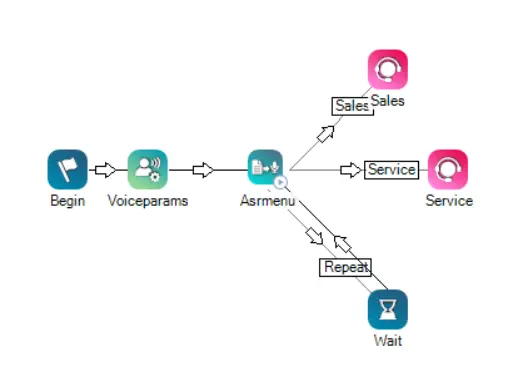
In this script, the Asrmenu action uses the CustomCases branch to route calls based on three different possible utterances by the caller: Sales, Service, or Repeat. These values are defined in the branch and used to recognize the caller’s utterance.
Script Example 2
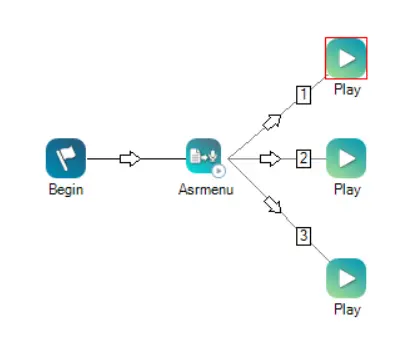
If DTMF is set to true, it is not necessary to spell out the variable paths on the menu as “one” and “1”. The speech engine recognizes the word “one” as the variable value 1. The appropriate script would look like:
Key Features of ASRMENU
- Speech Recognition
The action listens to caller responses and compares them against predefined phrases.
Example:
Caller Says: Sales
ASRMENU detects the word and routes the call to the Sales branch.
- DTMF Support
ASRMENU can also accept keypad input.
Example:
Press 1 or say Sales Press 2 or say Support Press 3 or say Billing
This provides flexibility for all callers.
- Custom Branch Routing
You can create custom speech branches for specific words or phrases.
Examples:
| Caller Says
|
Route To
| | — | — | |
Sales
|
Sales Queue
| |
Support
|
Support Queue
| |
Billing
|
Billing Queue
| |
Repeat
|
Replay Menu
|
This makes ASRMENU highly customizable.
Important ASRMENU Properties
Caption
Provides a unique name for the action.
Example:
Main_Menu
Sequence
Defines the prompt played to callers.
Example:
“Welcome to VoIP Trainers. Say Sales for Sales. Say Support for Support.”
Supports:
- Recorded WAV files
- Text-to-Speech (TTS)
- Mixed prompts
Phrase
Used only for documentation purposes.
Example:
Main IVR Menu Prompt
This does not affect execution.
MinConfidence
Determines the minimum speech recognition confidence level.
Example
40%
If the recognition score falls below this value:
OnNoConfidence Branch
is triggered.
TimeoutSeconds
Defines how long the system waits for caller input.
Example:
10 Seconds
If the caller remains silent:
OnTimeout Branch
executes.
ResultVarName
Stores the recognized speech result.
Example:
Caller says: Sales
Stored value:
ASRMENUResult = Sales
ConfidenceVarName
Stores confidence percentage.
Example:
ASRConf = 92
Meaning:
92% Recognition Accuracy
DetectDTMF
Determines whether keypad entries are accepted.
True
Voice + Keypad
False
Voice Only
ClearDigits
Controls DTMF buffer cleanup.
True
Old digits are removed.
False
Previous DTMF values remain in memory.
InterDigitTimeout
Defines waiting time between keypad presses.
Example:
Enter Account Number
System waits for additional digits before proceeding.
ContentType
Defines how speech is recognized.
Options
PhraseList
Recognizes phrases directly configured in Studio.
GrammarFile
Uses custom grammar files for advanced speech recognition.
GrammarFile
Allows use of custom speech grammar files.
Benefits:
- Better recognition
- Industry-specific terminology
- Large vocabulary support
Maximum size:
15 MB
TermDigit
Defines a termination key.
Most common:
Example:
Enter Account Number followed by #
MaxDigits
Defines maximum digits accepted.
Example:
Last 4 digits of SSN
Configuration:
MaxDigits = 4
If callers must enter:
1234#
Then:
MaxDigits = 5
ASRMENU Result Branches
Default
Executed when no other condition matches.
OnTerminator
Triggered when termination key is pressed.
OnMaxDigits
Triggered when maximum digits are reached.
OnNoConfidence
Triggered when speech confidence falls below the configured threshold.
OnTimeout
Triggered when caller remains silent.
OnError
Triggered for unexpected system issues.
Examples:
- Connectivity issues
- Syntax errors
- Recognition engine failures
Custom Cases
Allows custom speech routing.
Example:
Sales Support Billing Repeat
Each option routes to a different branch.
Real-World NICE CXone Studio Example
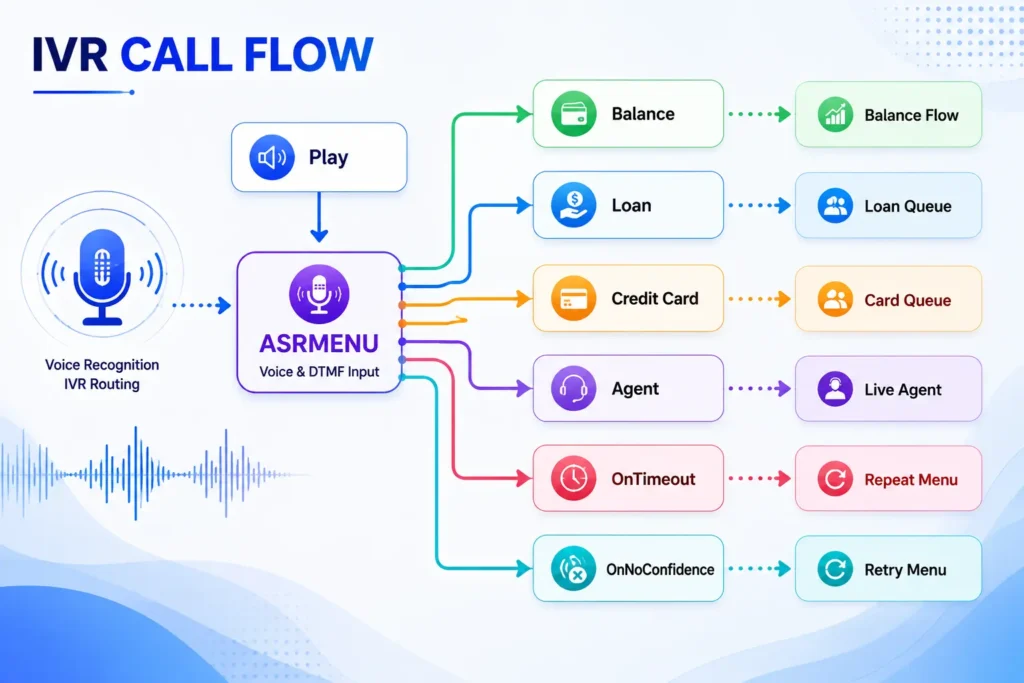
Banking IVR
Welcome to ABC Bank.
Say Balance for Account Balance. Say Loan for Loan Services. Say Credit Card for Card Services. Say Agent to speak with an advisor.
Best Practices for ASRMENU
Keep Prompts Short
Good:
Say Sales or Support.
Bad:
Please listen carefully because our menu options have changed…
Use Simple Words
Examples:
- Sales
- Support
- Billing
- Agent
Enable DTMF Backup
Always allow keypad input for callers who prefer it.
Configure Confidence Properly
Recommended:
40-50%
for most IVR menus.
Handle Errors Gracefully
Always connect:
- OnTimeout
- OnNoConfidence
- OnError
to retry logic.
Benefits of Learning ASRMENU in NICE CX Training
By mastering ASRMENU, administrators can:
- Build intelligent IVR systems
- Improve caller experience
- Reduce transfer rates
- Increase self-service adoption
- Implement voice-enabled customer journeys
- Enhance speech recognition workflows
- Become proficient in NICE CXone Studio development
Conclusion
ASRMENU Action in Studio is one of the most powerful speech-enabled IVR components in NICE CXone. It combines voice recognition, DTMF input, custom branching, confidence scoring, and intelligent call routing to create modern customer experiences. Learning ASRMENU is essential for professionals pursuing NICE CX Training Customized Training, as it enables the design of smart, user-friendly, and highly efficient contact center applications - VoipTrainers.