ASRTIME Action in NICE CXone Studio – Complete Guide with Examples & Diagrams
 VoIP Trainers4 min read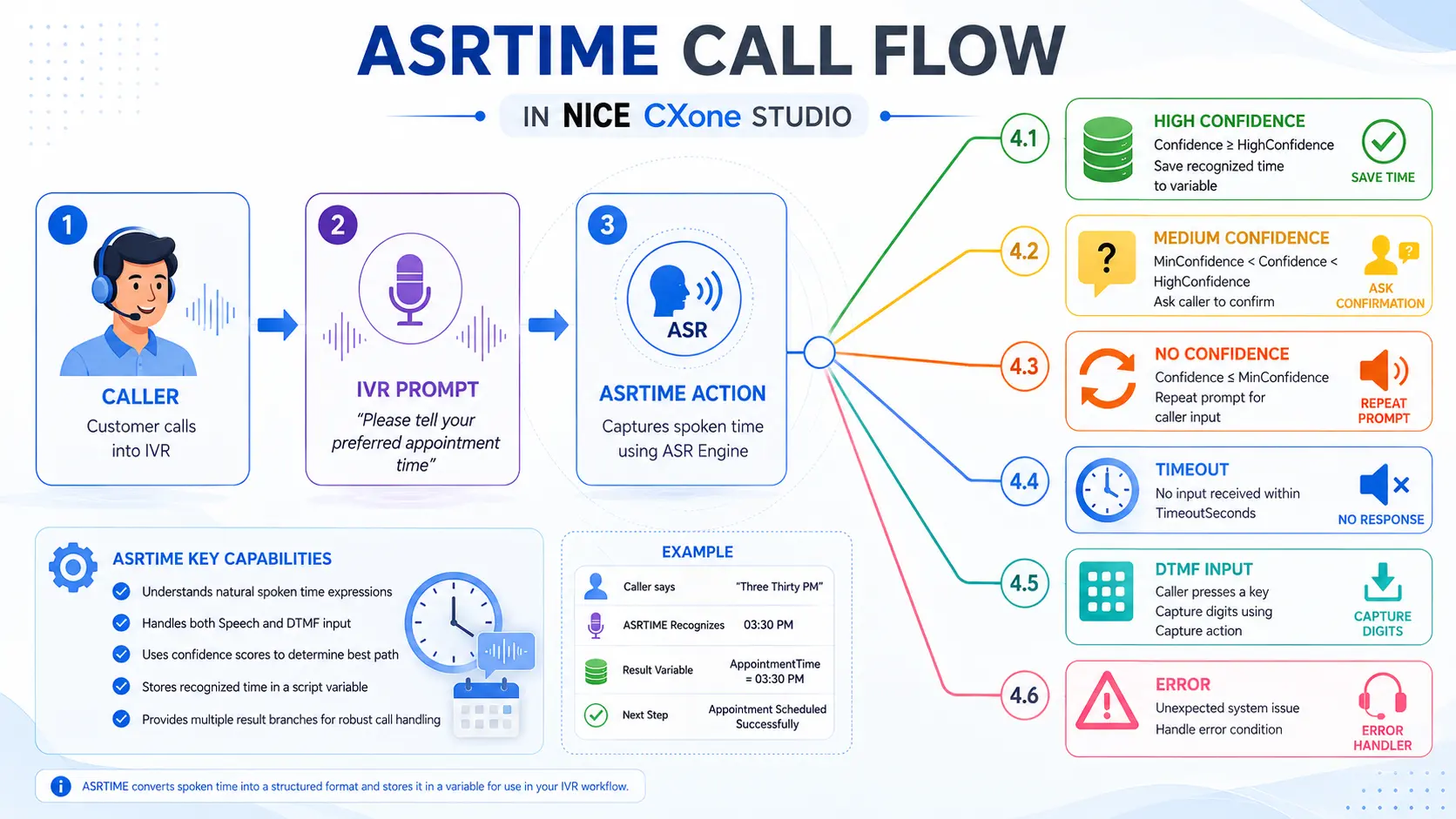
What is ASRTIME?
ASRTIME is an Automatic Speech Recognition (ASR) action in NICE CXone Studio that captures a time value spoken by a caller and stores it in a script variable.
It is commonly used when callers need to provide:
- Appointment times
- Meeting schedules
- Incident reporting times
- Delivery time preferences
- Callback request times
- Service booking times
Example
Caller says:
“Twelve PM”
ASRTIME recognizes:
12:00 PM
and stores it in a variable.
Real-World Scenario
Hospital Appointment Booking
IVR Prompt:
“Please tell us your preferred appointment time.”
Caller says:
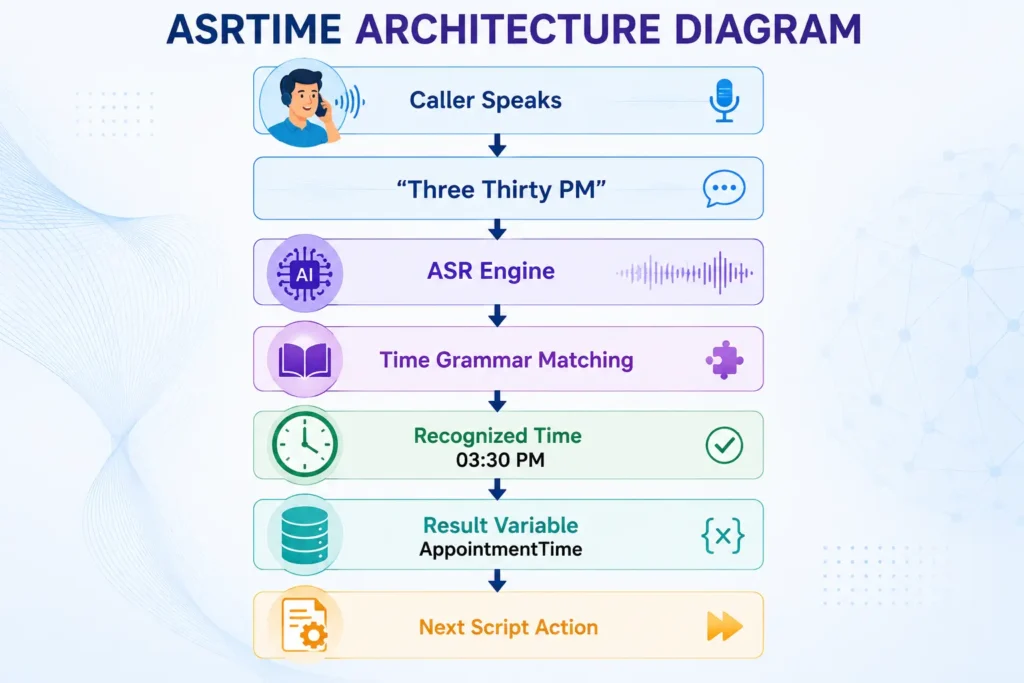
“Three thirty PM”
ASRTIME converts it to:
03:30 PM
Stores it in:
AppointmentTime = 03:30 PM
The script then schedules the appointment automatically.
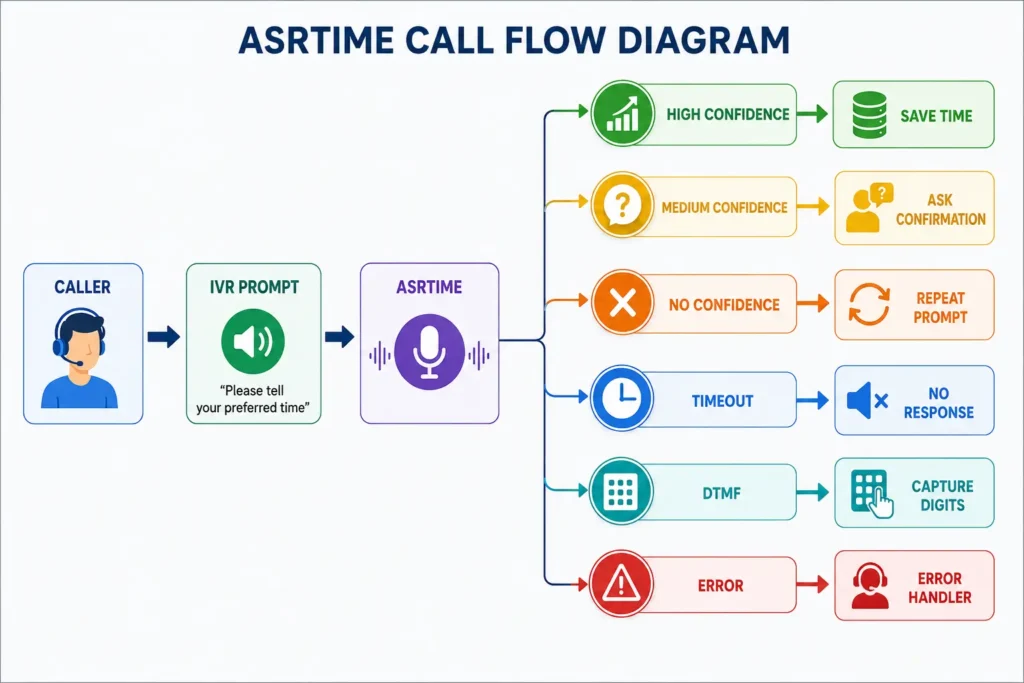
ASRTIME Call Flow Diagram
ASRTIME Architecture Diagram
Supported Time Formats
ASRTIME comes with a built-in grammar that understands many natural ways of speaking time.
| Caller Says
|
Recognized Value
| | — | — | |
Twelve PM
|
12:00 PM
| |
Twelve in the afternoon
|
12:00 PM
| |
Twelve hours
|
12:00 PM
| |
Three PM
|
03:00 PM
| |
Three Thirty PM
|
03:30 PM
| |
Ten Fifteen AM
|
10:15 AM
| |
Six O’Clock
|
06:00 PM
|
Input Properties Explained
- Caption
Purpose
Provides a unique label for the action on the Studio canvas.
Example:
Capture Appointment Time
Appears below the ASRTIME icon.
- Sequence
Purpose
Defines the prompt played to the caller.
Audio Prompt Example
“AppointmentTime.wav”
TTS Example
“%Please tell us your preferred appointment time.”
Call Flow
Play Prompt │ ▼ “Please tell us your appointment time” │ ▼ Caller Response
- Phrase
Purpose
Documentation field only.
Not used by the script.
Example:
Please tell us your preferred appointment time.
Useful for script readability.
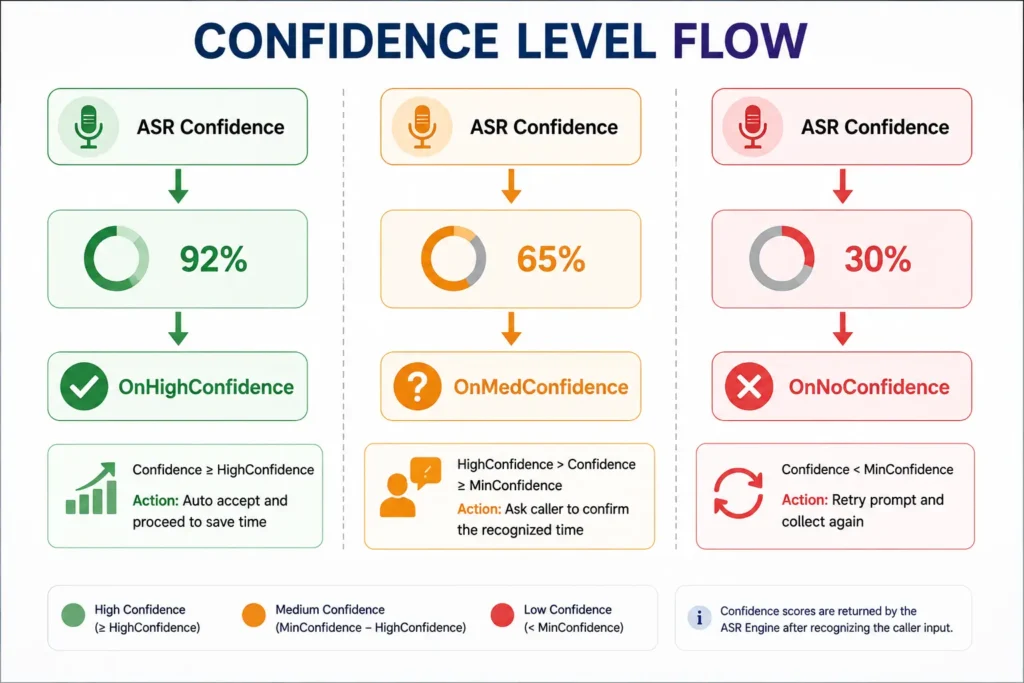
- HighConfidence
Purpose
Determines when recognition is considered highly accurate.
Default:
80
Example
Recognition Confidence:
92%
Since:
92 > 80
Branch Taken:
OnHighConfidence
- MinConfidence
Purpose
Minimum acceptable confidence level.
Default:
50
Example
Recognition Confidence:
65%
Since:
50 < 65 < 80
Branch Taken:
OnMedConfidence
- TimeoutSeconds
Purpose
Defines how long ASRTIME waits for caller input.
Default:
10 Seconds
Example
TimeoutSeconds = 15
Flow:
Prompt Ends │ ▼ Wait 15 Seconds │ ├── Caller Responds │ ▼ │ Continue │ └── No Response ▼ OnTimeout
- ResultVarName
Purpose
Stores recognized time.
Example:
AppointmentTime
After recognition:
AppointmentTime = 03:30 PM
- ConfidenceVarName
Purpose
Stores confidence score returned by ASR.
Example:
ASRConf
Value:
ASRConf = 92
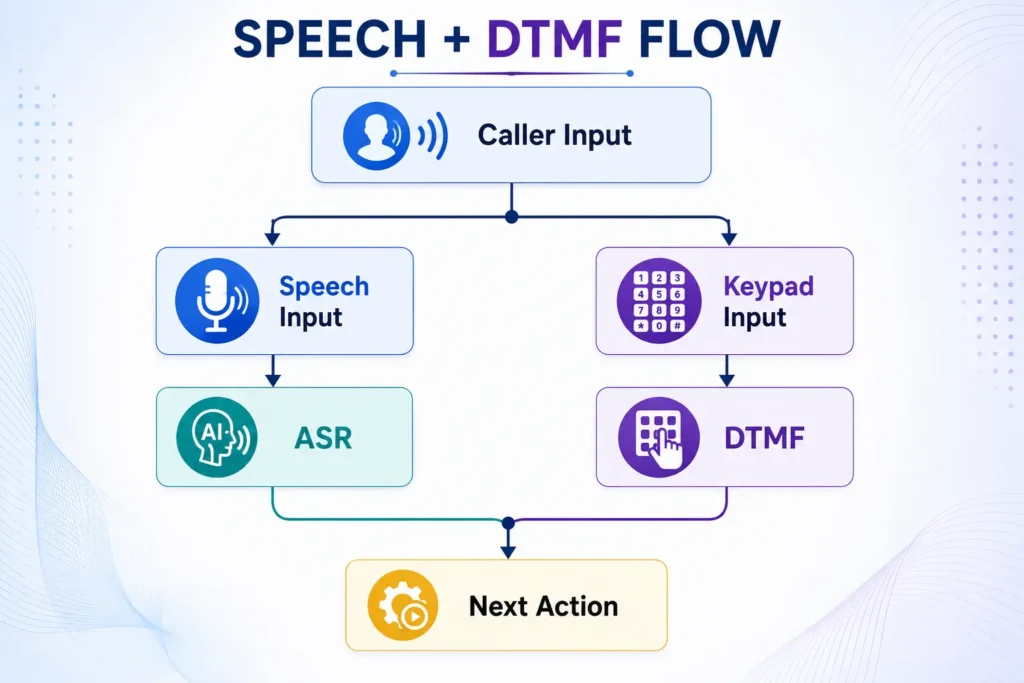
- DetectDTMF
Purpose
Allows callers to use speech or keypad.
True
DetectDTMF = True
Accepts:
- Voice input
- Keypad input
False
DetectDTMF = False
Accepts:
- Voice only
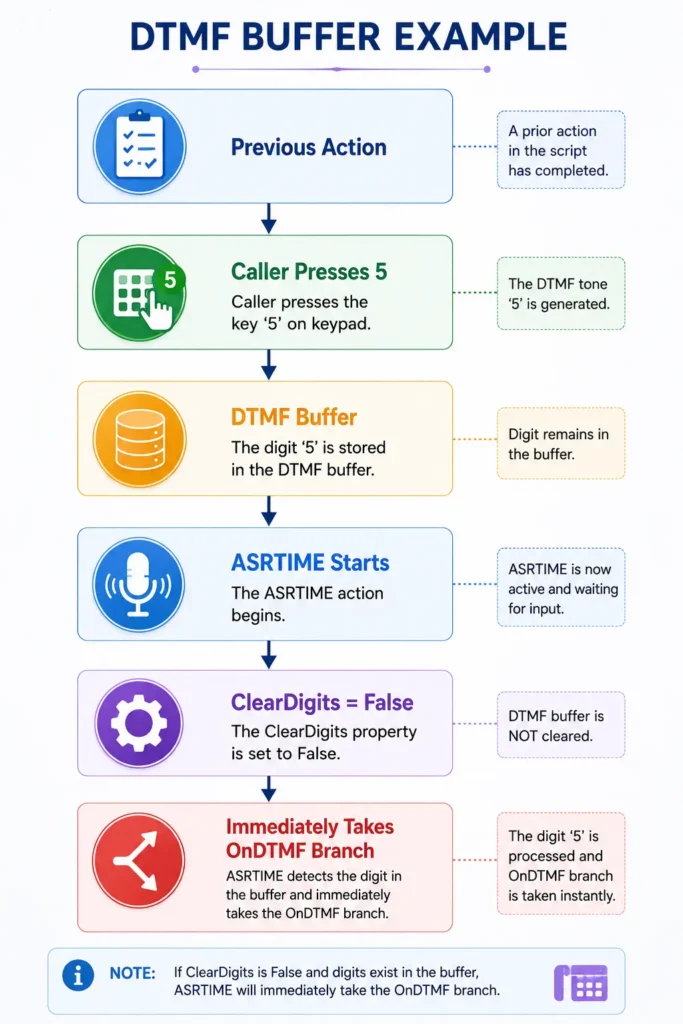
- ClearDigits
Purpose
Clears previously stored keypad digits.
Default:
True
Why Important?
Without clearing:
Caller Pressed 5 Earlier
The digit remains in buffer.
ASRTIME immediately detects it and takes:
OnDTMF
even though the digit belongs to a previous action.
Result Branches
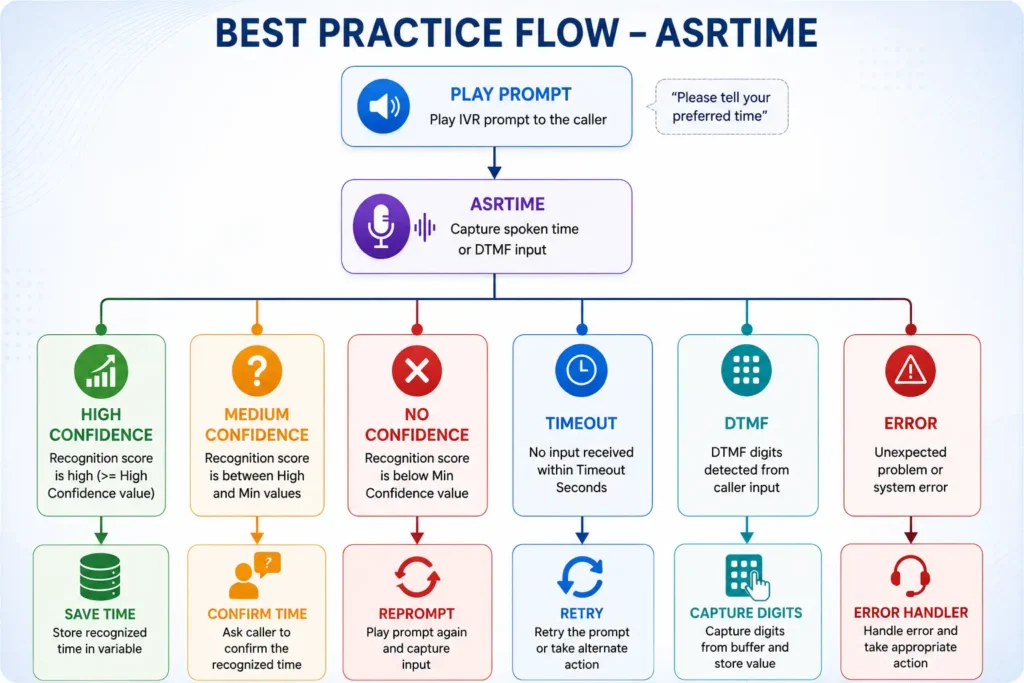
OnHighConfidence
Recognition above HighConfidence value.
Example:
Caller: Three PM Confidence: 95%
Branch:
OnHighConfidence
OnMedConfidence
Confidence between MinConfidence and HighConfidence.
Example:
Caller: Three PM Confidence: 70%
Flow:
ASRTIME │ ▼ OnMedConfidence │ ▼ ASRYESNO “Did you say 3 PM?”
OnNoConfidence
Confidence below minimum threshold.
Example:
Confidence = 40%
Branch:
OnNoConfidence
OnTimeout
Caller remains silent.
No Speech │ ▼ Timeout │ ▼ OnTimeout
OnError
System problem occurs.
Examples:
- Connectivity issue
- Grammar issue
- ASR service unavailable
OnError │ ▼ _ERR Variable Populated
OnDTMF
Caller presses keypad digits.
Caller Presses 1 │ ▼ OnDTMF │ ▼ Capture Action │ ▼ Store Value
Best Practice Flow
Tips & Tricks
Use Voiceparams to set the language locale.
Always configure OnMedConfidence for caller confirmation.
Set ClearDigits = True to avoid unwanted DTMF detection.
Use a Capture action after OnDTMF to retrieve keypad values.
Keep prompts short to avoid the 120-second system limit.
Store recognized times in meaningful variables such as:
AppointmentTime CallbackTime MeetingTime DeliveryTime IncidentTime
Suggested Images for Your Blog
Image 1: ASRTIME Call Flow
Caller → Prompt → ASRTIME → High/Medium/Low Confidence
Image 2: Speech Recognition Architecture
Caller Speech → ASR Engine → Time Grammar → Variable Storage
Image 3: Confidence Level Decision Tree
95% → High 70% → Medium 40% → Low
Image 4: Speech vs DTMF Input Flow
Speech Input OR Keypad Input ▼ ASRTIME
Image 5: Hospital Appointment Booking Example
Patient → “3:30 PM” → ASRTIME → Appointment Scheduled
Conclusion
The ASRTIME Action in NICE CXone Studio simplifies the collection of time-based information through natural speech recognition. Whether you’re building appointment scheduling systems, callback requests, delivery bookings, or incident reporting IVRs, ASRTIME accurately converts spoken time into structured data. By properly configuring confidence levels, DTMF handling, and timeout settings, you can create a seamless and user-friendly voice experience while reducing manual agent involvement NICE CX Training | VoipTrainers.