Begin Action in NiCE CXone Studio – Detailed Guide
 VoIP Trainers5 min read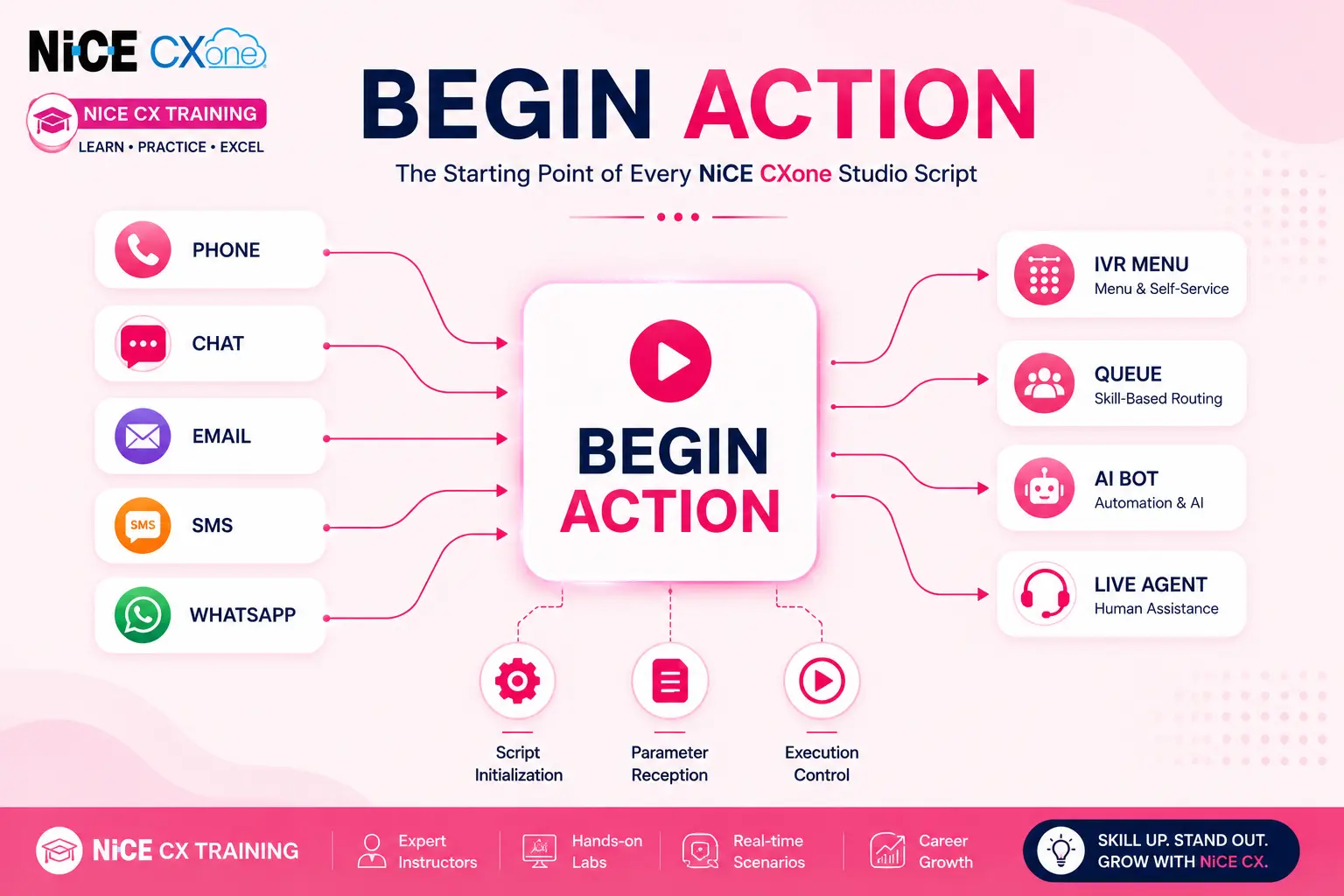
Begin
Supported Script Types
What is NICE CXone Begin Action?
The NICE CXone Begin Action is the starting point of every Studio script.This guide is useful for professionals enrolled in Nice CX Training who want to understand how the Begin Action works in NICE CXone Studio.
The Begin action is the starting point of every NiCE CXone Studio script. Whenever a call, chat, email, SMS, digital interaction, or work item enters the platform, the script execution starts from the Begin action.
Think of the Begin action as the main entrance door of your contact center workflow. Without it, the system doesn’t know where to start processing the interaction.
Basic Flow Diagram
Visual Representation
Why is Begin Important?
The NICE CXone Begin Action initializes script execution and receives parameters.During Nice CX Training, administrators learn how the Begin Action initializes scripts and receives parameters.
The Begin action serves several critical purposes:
1. Script Initialization
When the interaction arrives, Studio initializes all variables and starts processing from Begin.
2. Parameter Reception
If another script calls this script and passes parameters, Begin receives those parameter values.
3. Execution Control
It defines the exact starting point of script execution.
4. Trace Monitoring
Any parameters passed into the script are visible in Studio Trace through the Begin action.
Dependencies
Rule 2: Only One Begin Per Script
Every Studio script should contain only one Begin action.
Having multiple Begin actions can create unpredictable behavior.
Example of a Correct Script
Example of an Incorrect Script
BEGIN │ ▼ MENU
BEGIN │ ▼ REQAGENT
Multiple Begin actions may cause the script to start from an unexpected location.
Supported Script Types
The Begin action is supported in all Studio script types.
Phone Script
Chat Script
Email Script
SMS Script
Digital Script
Input Properties
The NICE CXone Begin Action can receive values from other scripts.
1. Caption Property
The Caption property allows you to give the Begin action a meaningful name.
Default
BEGIN
Recommended
BEGIN_Main_IVR BEGIN_Sales BEGIN_Support
Benefits
- Easier troubleshooting
- Better reporting
- Easier script maintenance
- Improved IVR Press Path reporting
Example
Caption: BEGIN_Customer_Service
When viewing reports, administrators can quickly identify which script handled the interaction.
2. Application Property
Description
The Application property exists in the Begin action but is currently not used.
Application = Not Used
No configuration is required.
3. Parameters Property
One of the most important features of Begin.
Purpose
Receives values passed from another script or application.
Default Parameters
p1 p2 p3 p4 p5 p6 p7 p8 p9
Example
Suppose Script A calls Script B.
Script A
RunSub CustomerID=1001 Language=English
Script B Begin
Default:
p1 = 1001 p2 = English
Better Practice
Rename parameters.
Instead of:
p1 p2
Use:
CustomerID Language
Configuration Example
Parameters
CustomerID Language AccountNumber
Result
CustomerID = 1001 Language = English AccountNumber = 987654
This makes scripts much easier to understand.
NICE CXone Begin Action Parameters Flow Diagram
Result Branch Conditions
The Begin action contains one branch:
Default Branch
This is the normal execution path.
      BEGIN
         │
        ▼
    DEFAULT
         │
        ▼
     MENU
If no special condition exists, the script continues through the Default branch.
Real Contact Center Example
Customer Service IVR
Troubleshooting Tips
Problem: Script Starts in the Wrong Place
Cause
A second Begin action was accidentally added.
Example
BEGIN (Original)
MENU
BEGIN (Accidental)
Studio may start from the last Begin action added.
Solution
- Open Studio script.
- Search for all Begin actions.
- Delete extra Begin actions.
- Keep only one Begin at the top.
Problem: Parameters Not Receive
Possible Causes
- Parameter name mismatch
- Wrong parameter order
- Calling script not passing values
Verify
Check Trace Output:
CustomerID = 1001 Language = English
If values are missing, verify the source script.
Best Practices for NICE CXone Begin Action
Proper configuration of the NICE CXone Begin Action improves script maintenance.Nice CX Training programs often emphasize using only one Begin Action per script.
Use Only One Begin Action
One Script = One Begin
Place Begin at the Top
BEGIN │ ▼ Business Logic
Use Meaningful Captions
BEGIN_MainIVR BEGIN_SupportQueue BEGIN_AfterHours
Rename Parameters
Instead of:
p1 p2 p3
Use:
CustomerID Language Priority
Check Trace Output
Always verify parameter values in Trace during testing.
Benefits of NICE CXone Begin Action
The NICE CXone Begin Action plays a crucial role in ensuring that every customer interaction is processed correctly from the moment it enters the platform. Whether the interaction originates from a phone call, chat session, email, SMS message, or digital channel, the NICE CXone Begin Action acts as the entry point that initiates script execution. By properly configuring the NICE CXone Begin Action, administrators can manage parameters, control workflow execution, and improve overall script performance. Understanding how the NICE CXone Begin Action functions is essential for building efficient and scalable contact center solutions within NICE CXone Studio.
Nice CX Training for Contact Center Professionals
Professionals attending Nice CX Training can learn how the Begin Action works as the entry point of every NICE CXone Studio script.During Nice CX Training, administrators gain hands-on experience with script execution, parameter handling, routing logic, and troubleshooting techniques.Understanding the NICE CXone Begin Action is an important topic covered in Nice CX Training programs for contact center engineers and developers.
Conclusion
The NICE CXone Begin Action is essential for every NICE CXone Studio workflow.The Begin Action is the entry point of every NiCE CXone Studio script. It initializes script execution, receives parameters from other scripts, and directs the interaction flow through its Default branch. Every script must contain exactly one Begin action, placed at the top of the workflow. Proper parameter naming, meaningful captions, and avoiding multiple Begin actions help ensure reliable and maintainable contact center scripting.Understanding the Begin Action is an essential skill covered in Nice CX Training and helps administrators build reliable workflows.By enrolling in Nice CX Training, professionals can build the skills needed to design, maintain, and optimize NICE CXone Studio workflows.
Quick Reference
| Property | Purpose |
|---|---|
| Caption | Custom name for reporting and identification |
| Application | Not used |
| Parameters | Receives values from calling scripts |
| Default Branch | Normal execution path |
Golden Rule: One Script → One Begin Action → One Starting Point - NICE CX Training | VoipTrainers.